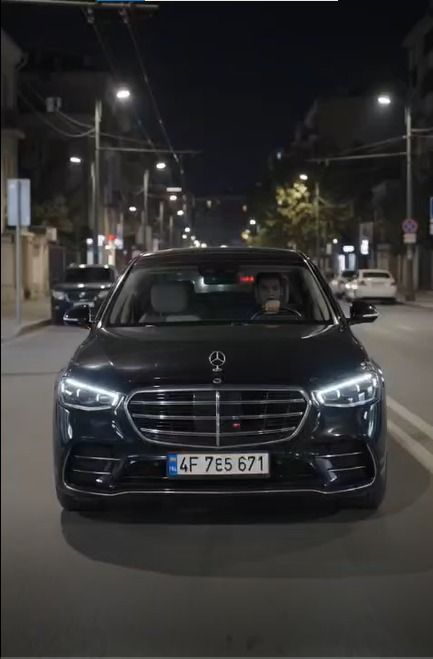
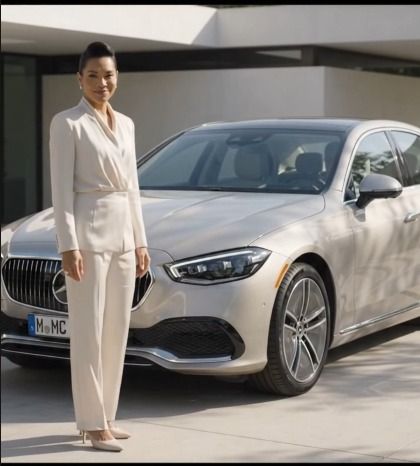
Featured image for: Mercedes Car Stand AI Video Editing Prompt: Create Luxury Car Videos
AI video generation has made it possible to create cinematic-looking car videos without a professional camera, expensive location or film crew. One of the most interesting uses is creating a Mercedes car stand AI video where a person appears naturally beside a luxury Mercedes while the car arrives, moves or stops in a cinematic environment.
The challenge is getting the details right.
A basic prompt may generate a luxury car, but the result can sometimes show only part of the vehicle, change the person's face, distort the car design or make the entire scene look artificial.
That's why a detailed Mercedes car video editing prompt is useful.
A good prompt should clearly explain the person's identity, car visibility, camera movement, environment, lighting, clothing, driving action and overall realism.
In this guide, you'll get a ready-to-copy Mercedes AI video prompt along with different variations and a step-by-step method for creating your own luxury car video.
What Is a Mercedes Car Stand AI Video Editing Prompt?
A Mercedes car stand AI video editing prompt is a detailed instruction that tells an AI video generator how to create or edit a video involving a Mercedes vehicle and a person.
Depending on the tool you use, you can create scenes such as:
Standing beside a Mercedes
Mercedes arriving from a distance
Walking toward a Mercedes
Standing next to a parked Mercedes
Opening the car door
Getting into the car
Walking around the vehicle
Luxury showroom scenes
Cinematic road scenes
Night-time Mercedes videos
Social-media-style luxury car reels
The prompt can also specify how the camera should move.
For example, you can request a slow camera push-in, side tracking shot, front three-quarter shot or a wide shot showing the entire Mercedes car.
Video Prompts
Best Mercedes Car Stand AI Video Prompt
Use the uploaded character image as the exact identity reference for the person. Preserve the person's facial identity, facial structure, hairstyle, skin tone, body proportions and recognizable features consistently throughout the entire video. Use the uploaded Mercedes reference image or reference video as the exact vehicle reference. Preserve the Mercedes model, body shape, proportions, grille, headlights, wheels, paint finish and overall exterior design.
Create a cinematic luxury-car scene in which the person is standing naturally beside a fully visible Mercedes-Benz vehicle. The entire car must remain clearly visible in the main wide shots, including the front, rear, roofline, wheels and overall body whenever the camera framing allows. Do not crop the car or hide it behind the person.
The Mercedes slowly arrives into the scene and comes to a smooth stop near the person. The vehicle movement must look physically realistic with accurate wheel rotation, suspension movement, reflections and natural road contact. The person remains naturally positioned beside the vehicle and looks toward the car and then toward the camera with a confident, relaxed expression.
Use realistic cinematic daylight, natural shadows, accurate reflections on the Mercedes body and realistic environmental lighting. The person's face must remain recognizable and consistent with the reference image. Do not replace, redesign or morph the face.
Camera starts with a wide establishing shot showing the complete Mercedes and the person together. Slowly move the camera forward using a smooth cinematic dolly movement, then transition into a front three-quarter angle while keeping the full vehicle visible. End with a premium luxury-car composition showing both the person and the complete Mercedes clearly in frame.
Photorealistic live-action appearance, natural human movement, realistic skin texture, realistic fabric, realistic car reflections, physically accurate lighting, professional automotive commercial style, cinematic depth of field, natural motion blur, high detail, realistic camera optics. No CGI appearance, no plastic skin, no artificial face, no distorted vehicle, no missing wheels, no extra limbs, no warped body panels, no text or watermark.
Click copy to use in Video Prompts
Complete Step-by-Step Editing Workflow
Copy the prompt: Use the dedicated copy button above to get the prompt.
Open your editing tool: Use your preferred AI image generator (ChatGPT, Google Gemini, Midjourney, or Bing).
Personalize the variables: Adjust background, clothing, lighting, pose, or mood according to your requirements.
Generate & refine: Generate the image and tweak small details if needed.
Export: Save the final high-quality output for your social media.
Article Tags
#AI video#video prompt#luxuary car video#chatgpt#flow
Found this prompt useful?
SHARE:
PCA
Modi
Verified Creator
Curates practical AI prompts, photo-editing resources, video-editing ideas, and creator-focused tutorials to help readers create top-quality digital content.
Comments & Reader Feedback (2)
Rohan SharmaSeptember 1, 2026
Super helpful prompt! The lighting and peacock feather crown came out incredible on Bing Image Creator.
Priya PatelAugust 31, 2026
Thank you PromptCopyAI! Shared this with all my photo editing groups.
Why This Prompt Works
Simply writing:
"Create a video of me with a Mercedes."
doesn't give the AI enough information.
The generator has to decide:
How large the car should appear
Where the person should stand
How the car moves
What the camera does
How the lighting behaves
What happens to the person's face
How much of the car should be visible
A detailed prompt reduces this ambiguity.
The most important instruction in this type of video is:
Keep the entire Mercedes clearly visible in wide and three-quarter shots.
This is especially useful when your goal is to showcase the vehicle rather than just the person.
Mercedes Arriving Beside the Person Prompt
Use my uploaded photo as the exact identity reference for the person. Preserve my face, facial features, hairstyle, skin tone and body proportions without identity drift. Use the provided Mercedes reference as the exact car design. Begin with a wide cinematic shot of the person standing on the side of a clean modern road. In the background, a complete Mercedes-Benz approaches slowly and naturally. The camera remains wide enough to show the entire vehicle as it drives toward the person.
The Mercedes gradually gets closer and smoothly stops beside the person. Show the complete car clearly, including all four wheels whenever physically possible, front grille, headlights, hood, windshield, side profile and body shape. The person remains natural and realistic, wearing a stylish formal suit, elegant sunglasses and a premium wristwatch.
After the car stops, the camera performs a slow cinematic movement from a wide front three-quarter shot toward a medium-wide composition showing the person and the complete Mercedes together. Preserve the person's facial identity exactly. Use realistic daylight, natural shadows, authentic reflections, realistic vehicle physics and live-action cinematography.
No CGI look, no cartoon appearance, no face replacement, no facial distortion, no vehicle deformation, no cropped car, no floating wheels, no unrealistic driving, no plastic skin, no excessive blur, no text or watermark.
Click copy to use in Video Prompts
Mercedes Luxury Cinematic Video Prompt
Create a premium cinematic luxury-car commercial featuring the person from the uploaded reference image standing confidently beside the exact Mercedes-Benz vehicle from the reference. Preserve the person's identity and facial characteristics exactly. The person wears a sophisticated black suit, stylish sunglasses and a luxury wristwatch.
Begin with a wide establishing shot showing the complete Mercedes parked beside the person. The camera slowly tracks from left to right while maintaining the full vehicle in frame. The Mercedes headlights turn on naturally, creating subtle reflections across the glossy body. The person takes a few natural steps toward the vehicle and pauses beside the front door.
Use realistic automotive commercial cinematography, natural reflections, detailed bodywork, realistic glass reflections, physically accurate shadows and subtle cinematic depth of field. Keep the Mercedes fully recognizable throughout the scene. Maintain consistent face, clothing, hairstyle and body proportions. Photorealistic live-action footage, premium luxury advertisement aesthetic, natural movement, realistic camera optics.
Click copy to use in Video Prompts
Night Mercedes AI Video Prompt
Create a photorealistic cinematic night-time Mercedes scene using the uploaded person image and Mercedes reference. Preserve the person's exact facial identity and natural body proportions. The person stands beside the complete Mercedes-Benz vehicle wearing a sophisticated black suit, sunglasses and a premium wristwatch.
The Mercedes is fully visible under realistic city lights. Its headlights illuminate the road naturally while subtle reflections appear across the vehicle's body. The camera starts with a wide shot showing the entire car and person, then slowly moves into a front three-quarter angle without cropping the vehicle. Use realistic street lighting, natural shadows, accurate reflections, subtle atmospheric depth and professional automotive commercial cinematography.
Keep the face recognizable and unchanged. No artificial skin, no CGI appearance, no distorted vehicle, no missing wheels, no stretched body panels, no unrealistic reflections and no excessive motion blur.
Click copy to use in Video Prompts
AI Video Prompt Negative Instructions
cropped car, partially visible car, hidden vehicle, distorted Mercedes, wrong car model, changing car design, warped wheels, missing wheels, floating vehicle, unrealistic driving, face change, identity drift, different person, facial distortion, plastic skin, CGI, 3D render, cartoon, artificial movement, extra fingers, extra limbs, deformed hands, body distortion, inconsistent clothing, inconsistent hairstyle, excessive blur, oversharpening, unrealistic reflections, duplicate person, text, logo, watermark
Creating the video becomes easier when you separate the process into reference, prompt and generation.
Step 1: Select Your Character Photo
Choose a clear photograph of yourself.
For better identity consistency:
Face should be clearly visible
Avoid extreme side angles
Use good lighting
Avoid heavy face filters
Use a reasonably high-resolution photograph
If you're using an AI editor that supports reference images, upload this as the character reference.
Step 2: Add Your Mercedes Reference
If you want a specific Mercedes model, use a clear reference image or video.
The reference should ideally show:
Full vehicle
Exterior design
Front grille
Headlights
Wheels
Side profile
Body shape
A full-car reference is particularly useful because it gives the AI more information about the vehicle.
Step 3: Decide the Video Action
Before generating, decide exactly what should happen.
For example:
Scene A: Person standing beside the car.
Scene B: Mercedes arrives.
Scene C: Car stops.
Scene D: Person walks toward the door.
Scene E: Camera moves around the vehicle.
Keeping the action simple generally makes consistency easier.
Step 4: Tell the AI What Must Stay Consistent
This is one of the most important parts.
Write:
Preserve the person's exact facial identity throughout the entire video.
You can also specify:
Keep the hairstyle, skin tone, facial structure, body proportions and clothing consistent from beginning to end.
For the vehicle:
Preserve the exact Mercedes model, body shape, wheels, grille, headlights and exterior design from the reference.
Step 5: Control the Camera
Don't leave the camera movement completely open-ended.
You can specify:
Wide establishing shot
Front three-quarter shot
Side tracking shot
Slow dolly-in
Low-angle automotive shot
Smooth camera orbit
Medium-wide shot
Static luxury commercial shot
For a Mercedes showcase, a wide establishing shot is particularly useful because it gives the vehicle enough space in the frame.
Step 6: Make Sure the Full Car Is Visible
If the previous AI result keeps showing only the person or only part of the vehicle, strengthen the instruction.
Use:
The entire Mercedes must remain clearly visible in the wide shot. Do not crop the vehicle. Keep sufficient distance between the camera and vehicle so the complete car fits inside the frame.
You can repeat this instruction once in the camera section, but don't overstuff the prompt with repetitions.
Step 7: Add Realistic Lighting
For a premium result, describe the lighting.
For daytime:
Natural afternoon sunlight with realistic directional shadows and accurate reflections on the Mercedes body.
For sunset:
Warm golden-hour sunlight with soft directional shadows and subtle reflections.
For nighttime:
Realistic urban street lighting with natural headlight illumination and controlled reflections.
Step 8: Generate the First Version
Don't try to create an extremely complicated sequence in the first generation.
Start with:
Person + Mercedes + simple movement + wide camera shot.
Once you get a good result, create variations.
This approach is generally easier than asking for multiple actions, complicated camera movements and environmental changes simultaneously.
Step 9: Refine the Video
If the Mercedes is not fully visible, use:
Keep the previous scene and camera style. Reframe the shot wider so the complete Mercedes-Benz vehicle is clearly visible from front to rear. Do not change the person's face or clothing.
If the face changes:
Preserve the exact facial identity from the uploaded reference. Do not redesign or reinterpret the face.
If the car changes:
Maintain the exact Mercedes design from the reference vehicle. Do not change the grille, headlights, wheels, body shape or proportions.
ChatGPT, Gemini and Flow for AI Prompt Work
Different AI tools can be useful for different parts of the workflow.
For example, ChatGPT can be used to develop, expand or customize a video prompt before you send it to your preferred video generator.
You can ask it to change the scene from a parked-car composition to a moving-car commercial while keeping the character and vehicle requirements unchanged.
Similarly, Gemini can be useful when you want to work with image references and develop visual concepts around your uploaded photographs.
For actual video generation, you can adapt the final prompt to Flow or another compatible AI video-generation platform.
Best Camera Shots for Mercedes AI Videos
Camera Shot
Best Use
Wide shot
Show entire Mercedes + person
Front three-quarter
Premium car showcase
Side tracking
Show vehicle movement
Low-angle shot
Luxury/aggressive appearance
Dolly-in
Dramatic introduction
Orbit shot
Showcase vehicle design
Static shot
Social-media portrait
Rear three-quarter
Show car leaving
Close-up
Headlight/wheel/detail shot
For your main scene, start with a wide shot before moving closer.
Recommended Video Settings
For social-media content, you can use:
Setting
Recommendation
Aspect Ratio
9:16
Resolution
1080p or higher
Frame Rate
24–30 fps
Duration
5–10 seconds
Style
Photorealistic
Camera
Cinematic
Motion
Natural
Lighting
Realistic
Output
Live-action look
For YouTube or website banners, a 16:9 landscape version may be more appropriate.
Common Problems and How to Fix Them
Problem 1: Only the Person Is Visible
Solution: Add:
Use a wide camera composition and keep the entire Mercedes clearly visible beside the person.
Problem 2: Mercedes Is Cropped
Solution:
Do not crop the vehicle. Maintain sufficient camera distance to show the complete car.
Problem 3: Face Doesn't Look Like the Reference
Solution:
Use the uploaded character image as the primary identity reference and preserve the exact facial structure and recognizable features.
Problem 4: Car Looks Like CGI
Add:
Photorealistic live-action automotive footage, realistic lens characteristics, natural reflections and physically accurate lighting.
Problem 5: Clothing Changes
Add:
Maintain identical clothing, color, design and accessories throughout the entire video.
Problem 6: Car Movement Looks Unrealistic
Add:
Use realistic vehicle physics, natural wheel rotation, suspension movement, road contact and acceleration.
Mercedes AI Video Prompt Ideas
Once you have created the basic video, you can create additional versions:
Luxury Hotel Scene
Person standing outside a luxury hotel while a Mercedes arrives.
Airport Scene
Mercedes arriving at a premium airport pickup area.
Business Scene
Person in a formal suit standing beside a Mercedes outside a modern office.
Wedding Scene
Mercedes arriving at a luxury wedding venue.
Night City Scene
Mercedes driving slowly through a modern city at night.
Mountain Scene
Person standing beside a Mercedes on a scenic mountain road.
Sunset Scene
Mercedes parked beside the person during golden hour.
These can become separate prompt articles on PromptCopyAI because each has a different search intent.
Frequently Asked Questions
What is a Mercedes Car Stand AI Video Editing Prompt?
It is an AI instruction designed to create or edit a video where a person appears naturally with a Mercedes-Benz vehicle, usually in a cinematic luxury setting.
Can I use my own photo?
Yes. If your selected AI video tool supports image references, you can upload your photograph as the character reference and instruct the model to preserve your identity.
How do I keep my face consistent?
Clearly specify that the uploaded image is the exact identity reference and ask the AI to preserve facial structure, recognizable features, hairstyle and skin tone throughout the video.
How can I show the complete Mercedes?
Use a wide camera composition and explicitly instruct the AI that the entire vehicle must remain visible. Avoid starting with an extreme close-up.
Can the Mercedes drive toward me?
Yes. You can instruct the AI to begin with the Mercedes at a distance, slowly approach and smoothly stop beside the person.
Can I make a Mercedes luxury commercial?
Yes. Add automotive-commercial camera movements, realistic reflections, controlled lighting, premium clothing and cinematic composition.
What video ratio should I use for Instagram Reels?
A 9:16 vertical format is generally suitable for Reels and Shorts.
Can I make the video look realistic?
Yes. Use terms such as photorealistic live-action, natural lighting, realistic vehicle physics, natural skin texture and authentic camera optics. Avoid excessive CGI-style language.
Why does AI sometimes change the Mercedes?
The model may reinterpret the vehicle when the reference isn't sufficiently clear. Use a high-quality full-car reference and explicitly instruct the AI to preserve the vehicle's design.
Can I use the same prompt with different AI video generators?
Generally, yes. However, prompt syntax, reference-image support and available controls differ between platforms, so you may need to adjust the wording for the specific generator.
Final Thoughts
Creating a realistic Mercedes Car Stand AI Video is not simply about telling an AI to "put me next to a Mercedes." The best results come from controlling the most important visual elements: character identity, vehicle reference, camera framing, movement, lighting, environment and realism.
If your main objective is to showcase the Mercedes, always give the vehicle enough space in the composition. A wide establishing shot is often more useful than immediately using a close-up because it allows viewers to see the complete car and the person together.
For character consistency, use a clear reference photograph and explicitly instruct the AI to preserve the person's facial identity, hairstyle, skin tone, proportions and clothing.
For vehicle consistency, provide a clear Mercedes reference and specify that the model, body shape, wheels, grille, headlights and exterior details should remain unchanged.
Start with a simple scene, generate the first version and then refine individual elements. If the car is cropped, widen the camera. If the face changes, strengthen the identity instruction. If the vehicle looks artificial, improve the lighting, reflection and live-action instructions.
With these techniques, the Mercedes Car Stand AI Video Editing Prompt can be adapted into luxury car reels, cinematic advertisements, Instagram videos, YouTube Shorts and other visual content.
ChatGPT '80s AI Portraits: Create Stunning Retro 1980s AI Photos with ChatGPT