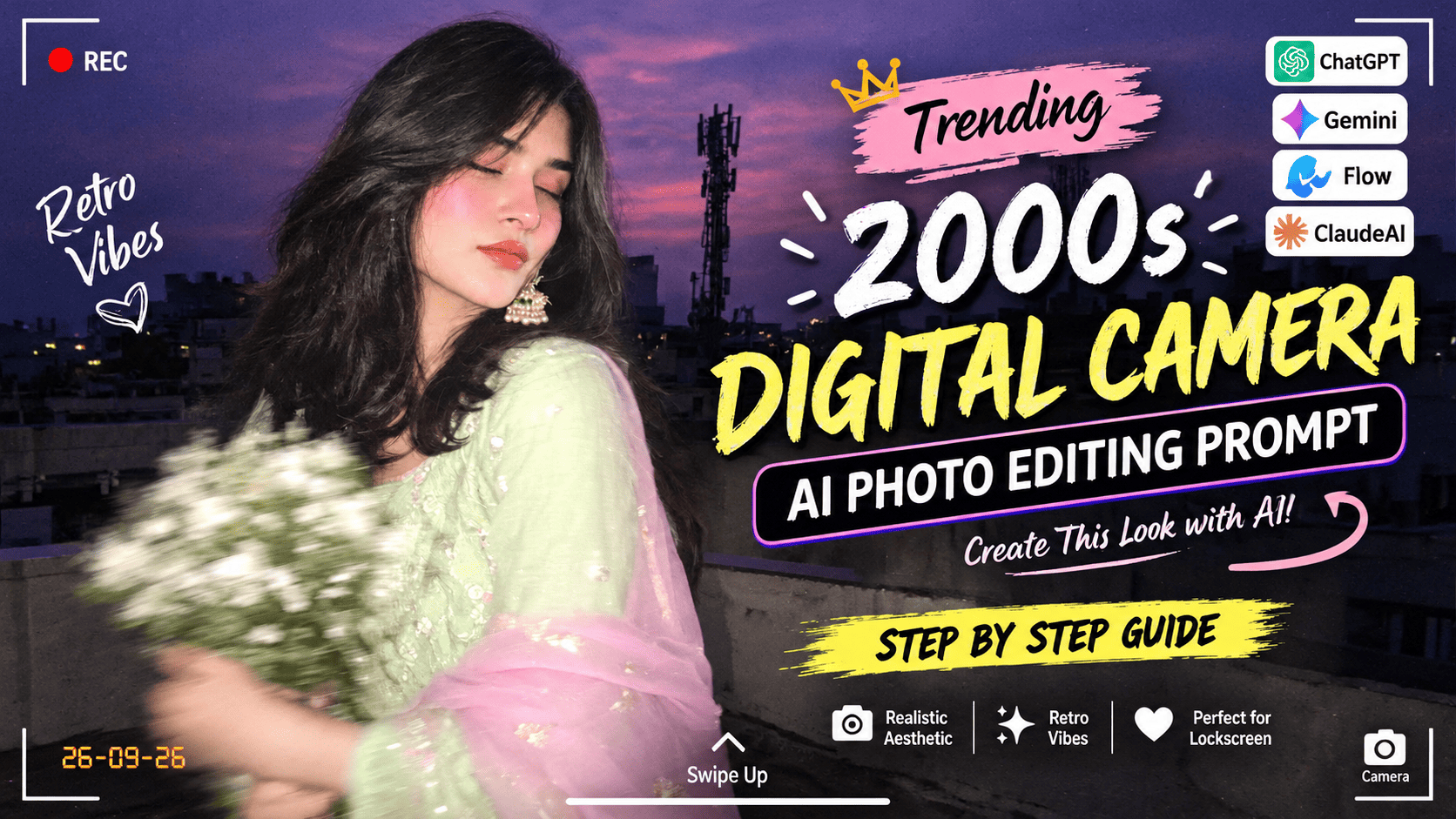
Featured image for: Trending 2000s Digital Camera AI Photo Editing Prompt: Create a Candid Rooftop Portrait
The 2000s digital camera aesthetic is trending again, bringing back the nostalgic look of early digital photography, direct flash, soft focus, motion blur, visible grain and spontaneous candid portraits.
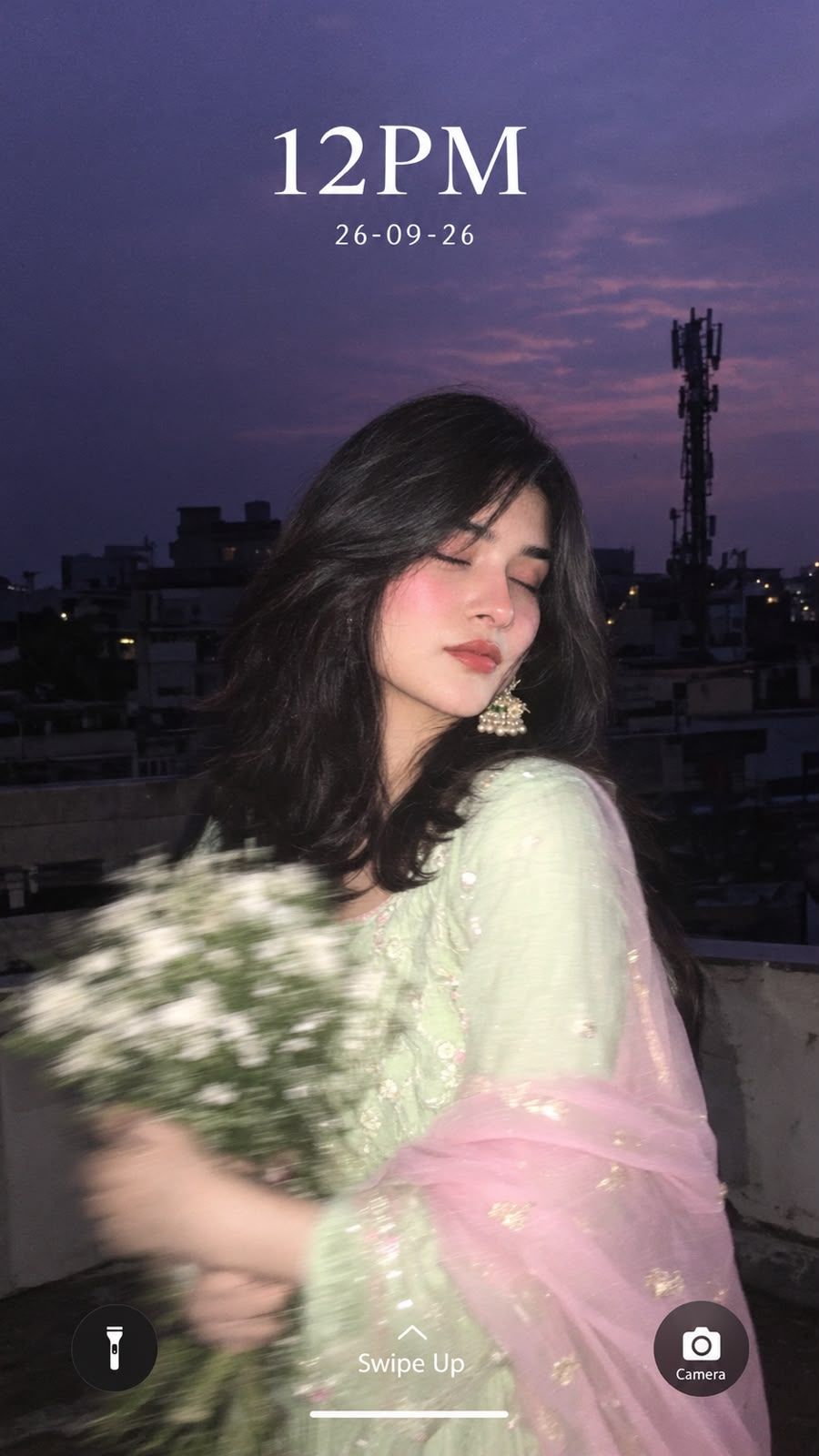
The reference image used for this concept combines that nostalgic photography style with a traditional Indian outfit, a rooftop setting, a dusky lavender sky and a bouquet of small white flowers. The result feels less like a polished studio photograph and more like a memorable picture captured casually on an old digital camera.
With the right AI photo editing prompt, you can recreate this type of aesthetic while maintaining the subject's facial features, clothing details, lighting and overall composition.
In this guide, you'll get a ready-to-copy AI photo editing prompt, variations, editing instructions, negative prompts, SEO-friendly tips and ideas for creating similar Y2K-inspired images using modern AI tools.
What Is the 2000s Digital Camera AI Photo Editing Trend?
The early 2000s had a distinctive photography style.
Unlike today's smartphone photographs, which often have computational HDR, extremely sharp details and carefully balanced exposure, old digital cameras frequently produced images with:
Direct flash
Dark backgrounds
Brightly illuminated subjects
Mild image grain
Soft focus
Motion blur
Slight overexposure
Cool or purple-toned shadows
Lower dynamic range
Strong flash reflections
Casual compositions
These imperfections are actually what make the style attractive today.
The current Y2K AI photo trend uses AI image generation and editing tools to recreate those characteristics while keeping the subject visually realistic.
Claude AI Prompts
Copy-Paste 2000s Digital Camera AI Photo Editing Prompt
Below is the main prompt based on the reference image.
Main AI Photo Editing Prompt
Create an ultra-realistic candid rooftop close-up portrait of the woman in the reference image as a nostalgic early-2000s digital-camera lockscreen wallpaper. Preserve her exact facial features, face shape, skin texture, natural warm blush, glossy lips, hairstyle and overall identity without changing or beautifying her into a different person.
Set the scene during blue hour on a rooftop with a dusky lavender-purple evening sky. She is standing with her body slightly turned away from the camera, her eyes softly closed, creating a natural peaceful candid expression. Both arms are holding a bouquet of small delicate white flowers in front of her body. Add realistic heavy motion blur to the hands and flowers, as if the photograph was captured spontaneously while she was moving.
She is wearing a pastel mint-green traditional Anarkali with subtle flowing fabric details and delicate embellishments. Add a sheer baby-pink dupatta loosely draped around her shoulders and arms. Preserve the traditional outfit's colors, fabric texture and natural folds. Add elegant statement earrings and long dark hair flowing naturally around her shoulders.
Use direct on-camera flash that brightly illuminates the woman while keeping the rooftop background noticeably darker. The flash should create a realistic early-2000s compact digital-camera appearance with soft flash glow, mild overexposure around highlights, subtle grain, slightly soft focus and imperfect exposure.
Background should contain a realistic urban rooftop, distant buildings, rooftop railings and a silhouetted mobile communication tower against the dusky purple-blue sky. Keep the background atmospheric and slightly dark while the subject remains strongly illuminated by the direct flash.
Recreate the authentic early-2000s digital-camera aesthetic rather than a modern smartphone photograph. Include mild sensor noise, subtle grain, soft details, natural motion blur, imperfect exposure, realistic flash falloff and a spontaneous candid composition. Avoid excessive HDR, modern computational photography, artificial skin smoothing or excessive sharpness.
Design the final image as a realistic smartphone lockscreen wallpaper. Add elegant white lockscreen-style text at the top reading “12PM”, with “26-09-26” underneath. At the bottom include “Swipe Up” in the center and “Camera” near the bottom-right with a simple camera icon. Keep the typography clean, minimal and naturally integrated into the photograph.
Ultra-realistic photography, authentic early-2000s compact digital camera aesthetic, candid portrait, direct flash photography, blue-hour rooftop, lavender-purple sky, realistic skin texture, natural hair, realistic fabric, subtle grain, soft focus, motion blur, nostalgic Y2K photography, imperfect exposure, cinematic composition, vertical 9:16 wallpaper.
Click copy to use in Claude AI Prompts
Complete Step-by-Step Editing Workflow
Copy the prompt: Use the dedicated copy button above to get the prompt.
Open your editing tool: Use your preferred AI image generator (ChatGPT, Google Gemini, Midjourney, or Bing).
Personalize the variables: Adjust background, clothing, lighting, pose, or mood according to your requirements.
Generate & refine: Generate the image and tweak small details if needed.
Export: Save the final high-quality output for your social media.
Curates practical AI prompts, photo-editing resources, video-editing ideas, and creator-focused tutorials to help readers create top-quality digital content.
Super helpful prompt! The lighting and peacock feather crown came out incredible on Bing Image Creator.
Priya PatelAugust 31, 2026
Thank you PromptCopyAI! Shared this with all my photo editing groups.
Why This Prompt Works
A strong AI photo editing prompt doesn't simply describe the subject. It also tells the AI how the photograph should look.
This prompt contains several important components.
1. Subject Preservation
The prompt specifically asks the AI to preserve:
Facial features
Face shape
Skin texture
Hair
Natural blush
Lips
Overall identity
This is important when editing an existing reference image because excessive transformation can cause the generated person to look noticeably different.
2. Lighting Direction
The direct flash is one of the most important elements of the aesthetic.
Instead of illuminating everything evenly, the prompt asks for:
Bright subject + dark background + direct flash
This creates the distinctive compact-camera appearance associated with early digital photography.
3. Motion Blur
The blurred bouquet and hands make the photograph appear spontaneous.
Rather than looking like a carefully posed studio photograph, the image feels like someone quickly captured a candid moment.
4. Imperfections
Modern AI images can sometimes look too perfect.
The prompt deliberately introduces:
Mild grain
Soft focus
Flash glow
Imperfect exposure
Motion blur
Sensor noise
These imperfections help create the nostalgic look.
Y2K Rooftop AI Photo Prompt Variation
If you want a stronger Y2K aesthetic, use this version:
Transform the reference image into an ultra-realistic early-2000s digital-camera photograph captured casually on an urban rooftop at blue hour. Preserve the exact facial identity, natural skin texture, hairstyle and facial proportions of the subject. She wears a pastel mint-green traditional Anarkali with a sheer baby-pink dupatta and statement earrings while holding a bouquet of small white flowers. Her eyes are gently closed and her body is slightly turned away from the camera. Use strong direct on-camera flash, dark urban background, lavender-purple sky, soft flash bloom, mild grain, realistic sensor noise, slight overexposure, imperfect white balance, soft focus and heavy motion blur around the moving hands and flowers. Keep the subject realistic rather than overly polished. Include distant rooftops, railings and a communication tower in silhouette. Authentic 2000s compact digital-camera photography, nostalgic Y2K aesthetic, candid composition, realistic imperfections, vertical 9:16.
How to Create This AI Photo
You can experiment with this prompt across different AI image-generation and editing platforms.
Tools such as ChatGPT, Gemini, Flow and ClaudeAI can be part of an AI image workflow, depending on the specific image-generation or editing capabilities available in the tool you're using.
Step 1: Select Your Reference Image
Start with a high-resolution portrait.
A good reference image should clearly show:
Face
Hair
Outfit
Body position
Accessories
A clear source image gives the AI more visual information to work with.
Step 2: Upload the Reference
Upload the photograph into your selected AI image-generation or editing tool.
Tell the tool that the uploaded image is the reference image and that the identity and important visual characteristics should remain consistent.
Step 3: Paste the Prompt
Copy the main prompt from this article and paste it into the generation field.
Don't remove the identity-preservation instructions if keeping the same person's appearance is important.
Step 4: Select 9:16
For a lockscreen-style image, use a vertical composition.
Recommended format:
Setting
Recommendation
Aspect Ratio
9:16
Style
Realistic photography
Lighting
Direct flash
Time
Blue hour
Aesthetic
Early 2000s digital camera
Composition
Close-up / portrait
Background
Urban rooftop
Output
High resolution
How to Get an Authentic 2000s Camera Look
Simply adding "Y2K" isn't always enough.
If the AI produces an image that looks like a modern DSLR photograph, add more specific photography instructions.
Use These Keywords
Early-2000s compact digital camera
Direct on-camera flash
Mild sensor noise
Slightly imperfect exposure
Soft focus
Flash falloff
Low dynamic range
Natural motion blur
Candid snapshot
Early digital photography
These terms give the model a much clearer visual direction.
The Importance of Direct Flash
The flash is one of the defining characteristics of this image concept.
In a typical modern portrait, the background and subject may be evenly exposed.
Here, the opposite effect is desirable.
The subject should appear:
Bright
Clearly illuminated
Slightly flash-heavy
While the background should remain:
Dark
Atmospheric
Slightly underexposed
Purple-blue
This contrast makes the image feel like a genuine nighttime snapshot taken with a compact digital camera.
Why Motion Blur Makes the Image More Realistic
The bouquet in the reference concept has noticeable movement.
This is an important detail.
Without motion blur, the AI may create a perfectly static fashion portrait. Adding realistic blur makes the scene feel spontaneous.
Try adding:
Natural directional motion blur on the moving hands and flowers while keeping the face relatively sharp.
This creates a visual distinction between the stationary subject and moving foreground elements.
Lock Screen Wallpaper AI Prompt
If you specifically want the final image to look like a phone lockscreen:
Create a vertical 9:16 realistic smartphone lockscreen wallpaper using the reference image. Preserve the exact identity and appearance of the subject. Maintain the early-2000s digital-camera aesthetic with direct flash, dark rooftop background, lavender-blue-hour sky, soft focus, mild grain and realistic motion blur. Leave sufficient clean negative space near the upper portion of the image for lockscreen typography. Add minimal white lockscreen text reading “12PM” at the top, “26-09-26” below it, “Swipe Up” near the bottom center and “Camera” near the bottom-right with a simple camera icon. Make the text appear naturally integrated with the wallpaper without covering the subject's face.
Negative Prompt for AI Photo Editing
If the generated image looks too artificial, add this negative prompt:
No modern smartphone HDR, no excessive sharpness, no plastic skin, no beauty filter, no unrealistic skin smoothing, no CGI appearance, no 3D render, no cartoon style, no anime, no artificial face, no facial distortion, no changed identity, no different hairstyle, no extra fingers, no deformed hands, no duplicated flowers, no unrealistic bouquet, no excessive saturation, no extreme bokeh, no studio lighting, no perfect exposure, no overly polished fashion photography, no excessive cinematic effects, no watermark, no random text, no misspelled lockscreen text.
Common Problems and How to Fix Them
1. The Face Doesn't Look Like the Reference
Add stronger identity instructions:
Preserve the exact facial structure, facial proportions, eyes, nose, lips, jawline, skin texture and overall identity from the reference image.
Avoid repeatedly asking the AI to "beautify" the person because this can encourage unnecessary facial changes.
2. The Image Looks Too Modern
If the result looks like a contemporary smartphone portrait, add:
Authentic early-2000s compact digital-camera photograph, imperfect exposure, direct flash, mild sensor noise and low dynamic range.
3. The Background Is Too Bright
Use:
Strong direct flash on the subject while keeping the background naturally underexposed and dark.
4. The Flowers Look Artificial
Add:
Small natural white flowers with realistic individual petals and natural motion blur caused by movement.
5. The Outfit Changes Color
Specify the colors explicitly:
Pastel mint-green Anarkali and sheer baby-pink dupatta; preserve these exact colors throughout the image.
AI Photo Editing Prompt Ideas Inspired by This Trend
Once you understand the style, you can create several variations.
Prompt Idea
Main Aesthetic
Y2K Rooftop Portrait
Direct flash + purple sky
2000s Birthday Photo
Flash + party decorations
Retro College Portrait
Digital-camera snapshot
Y2K Mirror Selfie
Flash reflection
Old Digital Camera Couple Photo
Candid flash
Rainy Night Portrait
Flash + wet streets
Rooftop Sunset Portrait
Warm sunset + grain
Early 2000s Wedding Photo
Flash + traditional outfit
Retro Bedroom Portrait
Low-light flash
Y2K Street Photography
Urban night + flash
Use ChatGPT, Gemini, Flow and ClaudeAI for Prompt Workflows
Different AI platforms can be useful at different stages of the creative process.
ChatGPT
You can use ChatGPTto refine an image prompt, create variations, improve descriptions and convert a basic idea into a detailed AI photo prompt.
For example, you could start with:
"Create a 2000s digital camera portrait with direct flash."
Then expand it with details about the outfit, location, lighting and composition.
Gemini
Geminican be useful when working with image references and experimenting with visual concepts, depending on the image-generation features available to you.
You can provide the reference image and specify the desired photography aesthetic.
Flow
Flowcan be explored when you want to take a still-image concept further into motion or video workflows. A successful still image can become the visual reference for a related cinematic video concept.
ClaudeAI
ClaudeAI can help with prompt structuring, rewriting and creating multiple variations of a detailed image concept before using the final prompt in your preferred image-generation platform.
For more ready-to-use AI prompts, explore PromptReplica, where you can organize different prompt ideas for image and video creation.
Expert Tips for Better AI Photo Results
Expert Tip 1: Don't Overdescribe Everything
Detailed prompts are useful, but every instruction should have a purpose.
Prioritize:
Subject identity
Clothing
Camera aesthetic
Lighting
Background
Composition
Effects
Expert Tip 2: Separate Subject and Environment
Tell the AI exactly what should remain stable and what should change.
For example:
Keep the face and body stable while allowing the flowers, hair and dupatta to move naturally.
This gives the model much more useful information.
Expert Tip 4: Don't Overuse Cinematic Effects
This particular trend is about casual digital-camera photography, not a Hollywood film frame.
Too much:
Lens flare
Extreme bokeh
HDR
Color grading
Glow
Sharpening
can destroy the authentic early-2000s appearance.
Frequently Asked Questions
What is a 2000s digital camera AI photo editing prompt?
It is an AI instruction designed to recreate the visual characteristics of early digital-camera photography, including direct flash, grain, soft focus, motion blur and imperfect exposure.
Can I use this prompt with Gemini?
Yes. You can adapt the prompt for Gemini if the image-generation or editing feature available to you supports the workflow.
Can I use the prompt in ChatGPT?
Yes. ChatGPT can be used to develop and refine image prompts, and compatible image-generation functionality can be used to create visual results.
Can I use this concept for a lockscreen wallpaper?
Yes. The prompt is specifically designed around a 9:16 vertical lockscreen composition, with space for lockscreen-style text.
Why does the AI image look too perfect?
Modern AI models often produce highly polished images. Add instructions such as mild sensor noise, imperfect exposure, soft focus, direct flash and authentic compact digital-camera photography to make the result less polished.
How do I create the purple-blue-hour background?
Use phrases such as:
dusky lavender-purple sky, blue hour, dark urban rooftop and subtle purple-pink clouds.
Can I change the outfit?
Yes. You can replace the mint-green Anarkali and pink dupatta with a saree, lehenga, salwar suit or another outfit while keeping the same photography aesthetic.
Can I use this prompt for other AI photo trends?
Absolutely. The same structure can be adapted for Y2K portraits, retro couple photos, birthday photos, wedding portraits, rooftop photography and nostalgic digital-camera selfies.
Conclusion
The 2000s Digital Camera AI Photo Editing Prompt combines one of the most recognizable retro photography aesthetics with modern AI image-generation technology.
The key elements are the direct flash, dark rooftop background, lavender-blue-hour sky, subtle grain, soft focus, realistic motion blur and candid composition. Together, these details help move the image away from a polished modern AI portrait and toward the nostalgic appearance of an early-2000s digital-camera photograph.
The reference concept also demonstrates how traditional fashion can work beautifully with the Y2K aesthetic. The pastel mint-green Anarkali, baby-pink dupatta, white flower bouquet and statement earrings create a strong visual contrast against the dark urban rooftop.
For the best result, start with a clear reference image, preserve the subject's important facial characteristics, describe the lighting precisely and avoid excessive modern photography effects.
You can use ChatGPT, Gemini, Flow or ClaudeAI to develop and refine variations of the concept, while PromptReplicacan be used as a source of ready-to-use AI image and video prompt ideas.
Mountain View Vibe Video Editing Prompt for Flow AI: Create Cinematic Mountain Videos