Featured image for: Anime Flashlight AI Photo Prompt: Create Cinematic Anime Photos in 2026
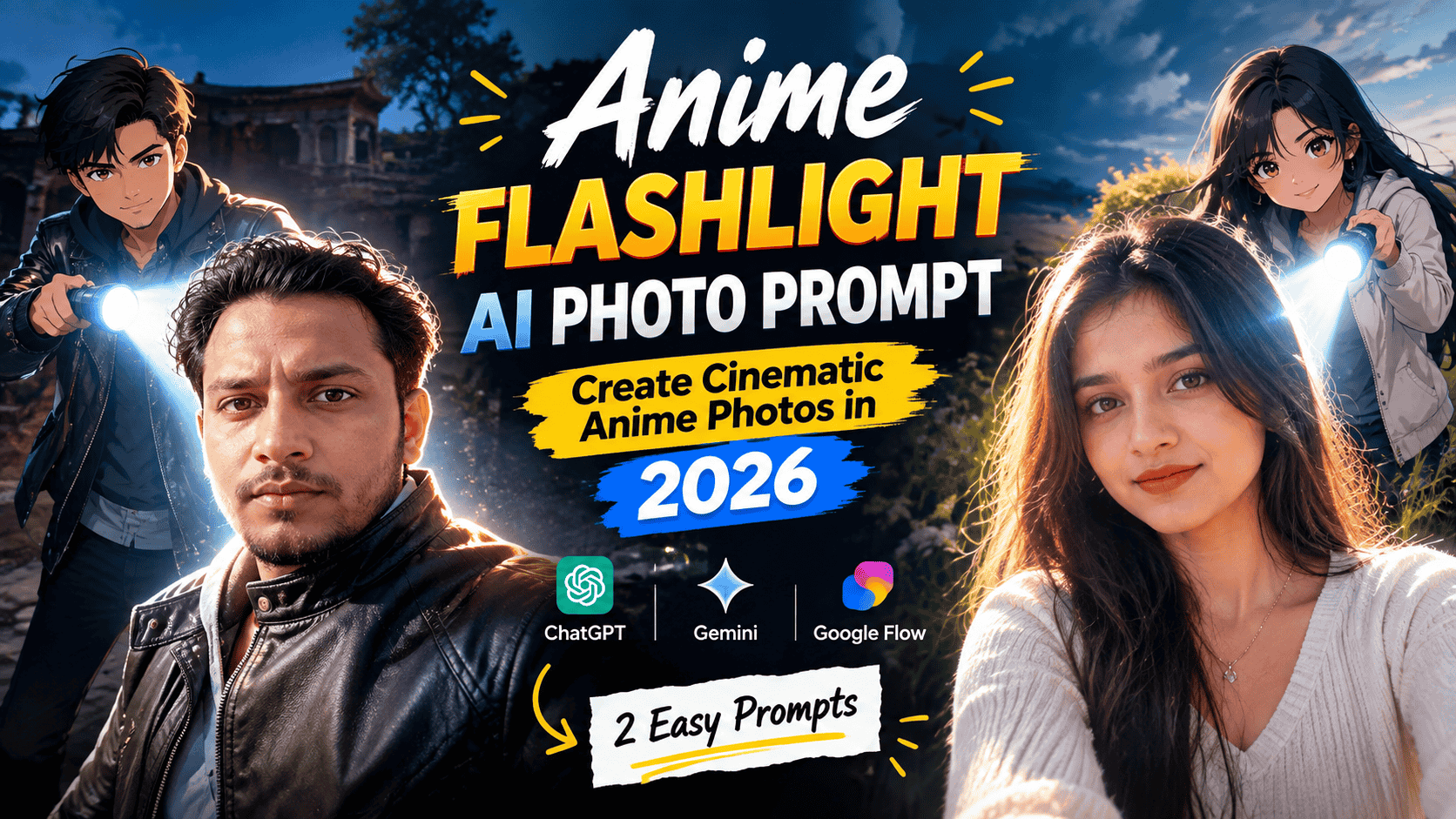
Anime-style photo editing has become a popular way to transform an ordinary picture into a creative cinematic scene without completely changing the original photograph. The Anime Flashlight AI Photo Editing Prompt 2026 creates an interesting effect by adding a miniature anime version of the person into the same scene. The anime character stands behind the real subject and points a bright flashlight toward them, creating glowing rim light, shadows, and a dramatic atmosphere. The key is to keep the original person, clothing, pose, camera perspective, and background recognizable while making the added character look naturally integrated. This type of edit can be created with modern AI image-editing tools that support reference-photo editing. The technique is especially useful for social media photos, profile pictures, creative posts, and experimental AI photography. You can also use ChatGPTwith an image-editing workflow to experiment with variations of the concept.
What Is the Anime Flashlight AI Photo Editing Trend?
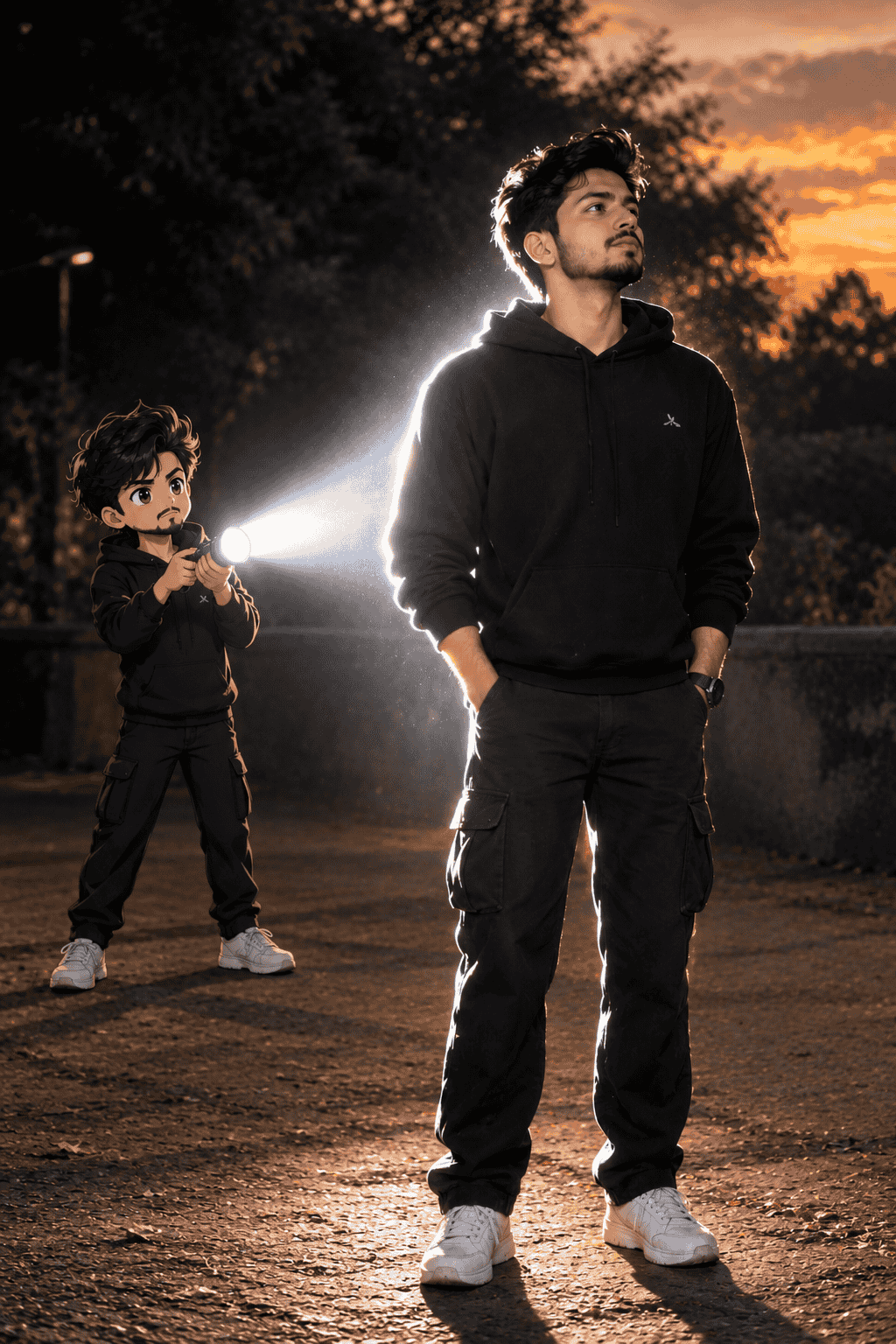
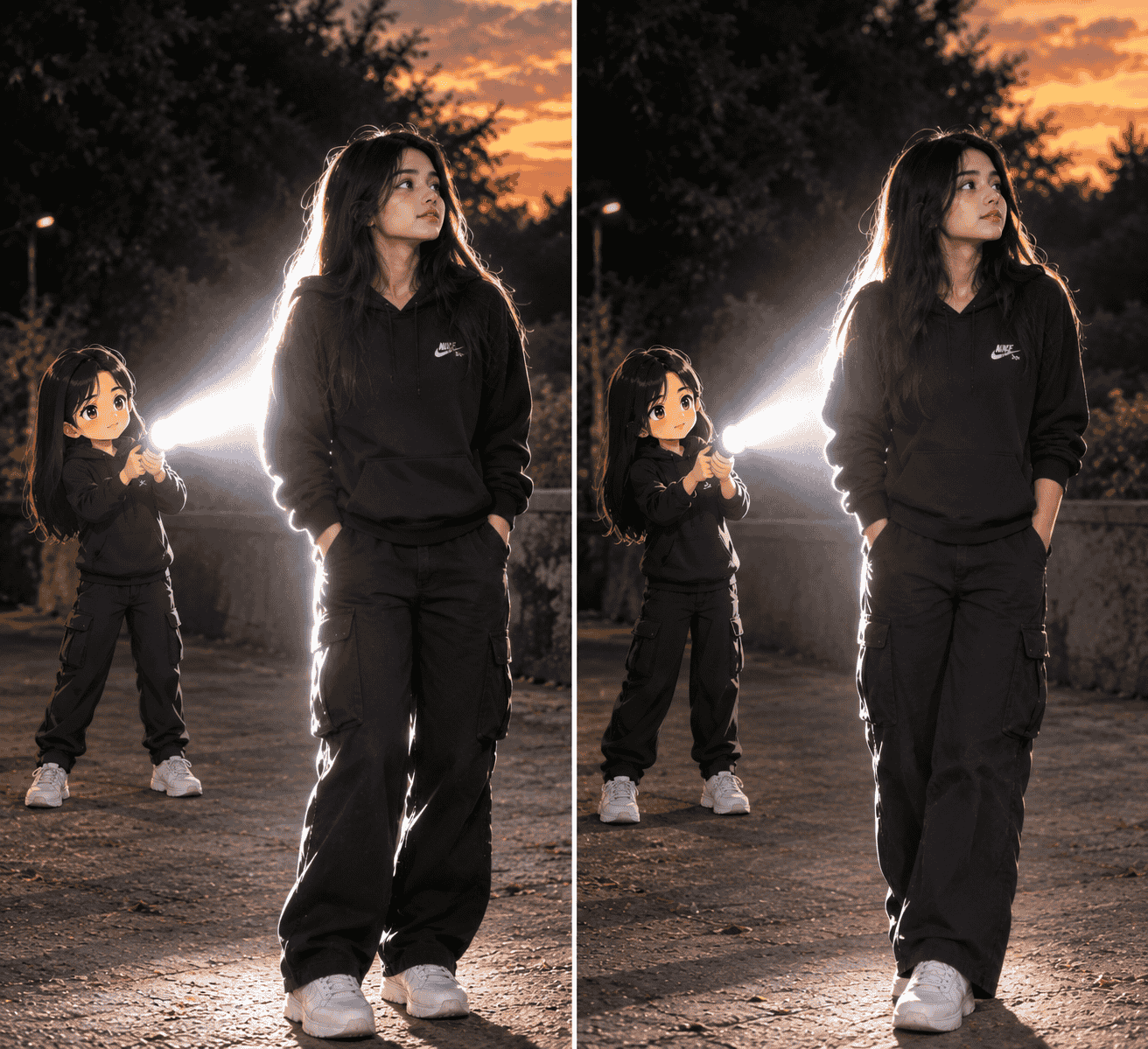
The Anime Flashlight effect combines two different visual styles in one photograph: a realistic original photo and a small anime-style version of the same person.
Instead of turning the entire image into an anime illustration, the main subject remains realistic. A miniature anime character is added behind the person, wearing similar clothes and matching important visual details such as hairstyle and accessories.
The anime character holds a flashlight aimed toward the back of the real subject. The bright beam then becomes an important part of the composition, creating a glowing outline around the person.
This combination makes the final image look like a scene where the anime version of the subject actually exists inside the original photograph.
For the best result, use a clear photo where your face, hairstyle, clothes, and body position are easy to see.
ChatGPT Prompts
Anime Flashlight AI Photo Editing Prompt
Transform the uploaded photo into a realistic anime-meets-photography scene. Keep the original person completely recognizable and preserve their face, hairstyle, skin tone, clothing, accessories, body proportions, pose, camera angle, framing, and overall appearance. Add a small full-body anime version of the same person naturally standing behind the main subject. The anime character should match the original person's hairstyle, outfit, colors, and visible accessories while using a polished modern anime style with clean linework, expressive facial details, subtle cel shading, and slightly exaggerated proportions.
Place the anime character behind the real subject and make them hold a flashlight aimed directly toward the subject's back. Create a strong realistic white flashlight beam that produces bright rim lighting around the real person's body, soft glow, natural shadows, and subtle atmospheric light. Keep the original environment, background, perspective, and composition unchanged. Make the anime character interact naturally with the environment using realistic contact shadows and matching light direction. Slightly reduce the surrounding brightness so the flashlight becomes visually prominent without making the scene look artificial. Create a highly detailed, photorealistic final image with a seamless anime character integration.
Click copy to use in ChatGPT Prompts
Complete Step-by-Step Editing Workflow
Copy the prompt: Use the dedicated copy button above to get the prompt.
Open your editing tool: Use your preferred AI image generator (ChatGPT, Google Gemini, Midjourney, or Bing).
Personalize the variables: Adjust background, clothing, lighting, pose, or mood according to your requirements.
Generate & refine: Generate the image and tweak small details if needed.
Export: Save the final high-quality output for your social media.
Curates practical AI prompts, photo-editing resources, video-editing ideas, and creator-focused tutorials to help readers create top-quality digital content.
Super helpful prompt! The lighting and peacock feather crown came out incredible on Bing Image Creator.
Priya PatelAugust 31, 2026
Thank you PromptCopyAI! Shared this with all my photo editing groups.
Why This Prompt Works
The first prompt focuses on the most important elements of the effect: identity preservation, anime character placement, flashlight direction, lighting, and background consistency.
Simply asking an AI tool to “add an anime character with a flashlight” can produce an image where the character looks like a sticker. More detailed instructions help establish how the new character should interact with the existing photograph.
The prompt also tells the AI to maintain the original camera perspective. This is important because the anime character should appear to occupy the same physical space as the real person rather than appearing pasted into the image.
Another important instruction is the matching outfit. When the anime character wears similar clothes to the original subject, viewers can more easily understand that it represents an anime version of the same person.
How the Flashlight Lighting Creates the Effect
The flashlight is the central visual element of this concept.
A convincing result needs more than a simple white beam. The light should interact with the subject and surrounding environment. For example, the edge of the person's shoulders and hair can receive brighter illumination while the surrounding areas remain comparatively darker.
This creates rim lighting, which is commonly used in cinematic photography to separate a subject from the background.
The AI should also create soft glow around the brightest portion of the beam. Natural-looking shadows can further help the anime character appear physically present in the scene.
If the first generation produces an overly bright or unrealistic flashlight, you can regenerate the image with instructions such as “reduce the beam intensity” or “make the illumination more natural.”
Create the Anime Flashlight Photo With Your Own Image
Before generating the image, select a photograph with good visibility.
A front-facing or slightly angled portrait can work well because the AI has enough information to understand your appearance. Photos with extremely dark faces, heavy motion blur, or objects covering most of the body may produce less consistent results.
After selecting your photo, upload it to your preferred AI image-editing platform. Paste the prompt and generate the image.
You can experiment with several versions by changing the position of the miniature character. For example, the anime version can stand directly behind you, slightly to one side, or farther into the background.
The important part is maintaining a believable relationship between the character, flashlight beam, subject, and environment.
ChatGPT Prompts
Second Anime Flashlight AI Photo Editing Prompt
Edit the uploaded photograph while preserving the original real person exactly as much as possible. Maintain the person's recognizable facial features, hairstyle, skin tone, clothing, accessories, body proportions, posture, hand position, camera perspective, and natural photographic appearance. Do not replace or redesign the main subject.
Add a miniature full-body anime version of the same person standing naturally behind them. Match the anime character's hairstyle, clothing design, colors, and recognizable visual details to the original subject. Use refined modern anime artwork, crisp linework, expressive eyes, controlled cel shading, realistic proportions, and detailed clothing.
The anime character should hold a realistic flashlight pointed toward the back of the real subject. Create a concentrated white light beam that produces cinematic rim light, subtle bloom, atmospheric glow, realistic highlights, and soft shadows on the subject and nearby environment. Make the flashlight illumination follow the existing direction and perspective of the photograph.
Preserve the original background, landscape, architecture, sky, objects, framing, depth, and camera angle. Do not replace the environment. Integrate the anime character into the scene with accurate scale, perspective, contact shadows, and light interaction. Keep the main subject photorealistic while allowing only the added character to have an anime appearance. The final result should look like a professionally photographed cinematic scene where the anime version naturally exists behind the real person.
Click copy to use in ChatGPT Prompts
Tips for Getting Better Anime Flashlight Results
The quality of your reference image can make a major difference. Try these simple tips before generating your edit:
1. Use a Clear Original Photo
Choose a high-resolution image where your face, hairstyle, and clothing are visible. Clear reference details give the AI more information to work with.
2. Keep Your Main Subject Unchanged
If you want a realistic result, specifically instruct the AI not to modify the original person's identity or clothing. This can help reduce unnecessary facial and body changes.
3. Match the Anime Character's Outfit
Tell the AI to reproduce the same clothing colors and accessories on the miniature character. This creates a stronger connection between the real and anime versions.
4. Control the Flashlight Brightness
Too much brightness can hide facial and clothing details. If the flashlight becomes overpowering, regenerate the image with softer illumination and controlled bloom.
5. Preserve the Original Background
A completely redesigned background can make the image look like a generated illustration rather than an edited photograph. Keeping the original environment helps maintain photographic realism.
6. Try Multiple Generations
AI image editing can produce different character positions, facial details, lighting, and proportions in each generation. Creating several versions can help you find a composition that matches your original photo more closely.
Can You Try This Effect With Different AI Tools?
Yes. The same concept can be adapted to different image-generation and editing platforms. Geminican be used for experimenting with reference-based image edits, while other image tools may offer different levels of control over character consistency, lighting, and composition.
You can also adapt the prompt for Google Flow when building a broader creative workflow around AI-generated visual content. The exact result will depend on the platform's current image-editing capabilities and how well it interprets reference images.
Final Thoughts
The Anime Flashlight AI Photo Editing Prompt 2026 is a creative way to combine a realistic photograph with a miniature anime version of the same person. The most recognizable parts of the effect are the small anime character, matching outfit, flashlight beam, bright rim lighting, and darker cinematic surroundings.
For the most natural result, start with a clear photograph and focus on preserving the original subject and background. The anime character should be treated as a new element inside the existing scene rather than replacing the photograph.
Try both prompts above and generate a few variations. Small changes in character placement, flashlight intensity, shadows, and glow can produce noticeably different results. This makes the effect useful for social media posts, profile images, creative photography experiments, and AI photo-editing projects.
Realistic Couple Portrait AI Prompt: Create Natural Romantic Photos with AI