Featured image for: Celebrity Funny Dance AI Video Editing Prompt 2026
Creating entertaining AI videos has become much easier with modern AI video-generation tools. A simple photo can now be transformed into a cinematic dance sequence with realistic movements, expressions, camera motion, and scene transitions. Whether you want to create a funny reel, a creative fan edit, or an entertaining social media video, a well-written prompt can make a major difference.
Tools such as ChatGPTcan also help creators develop structured AI video prompts by turning a basic idea into detailed instructions for movement, camera angles, expressions, lighting, and scene continuity.
The Celebrity Funny Dance AI Video Editing Prompt 2026 is designed around this concept. Instead of asking an AI video generator to simply “make the person dance,” the prompt gives the model a reference video and asks it to preserve the important visual elements while adapting the character identity.
The result can be a funny, cinematic and highly entertaining short-form video suitable for platforms such as Instagram Reels, YouTube Shorts and Facebook.
What Is Celebrity Funny Dance AI Video Editing?
Celebrity Funny Dance AI Video Editing is a creative AI video technique where a reference image or character is combined with a dance video to create a new entertaining sequence.
The reference video provides important information such as movement, choreography, camera behavior, timing, framing and expressions. The uploaded character image can then be used as the identity reference.
Instead of manually recording a new dance video, the AI model attempts to recreate the visual sequence digitally.
This approach is particularly useful when you want to experiment with funny character interactions, cinematic dance movements, reaction shots or short social-media videos.
Video Prompts
Celebrity Funny Dance AI Video Editing Prompt
Use the uploaded reference video as the PRIMARY visual and motion reference. Recreate the overall video as closely as possible while preserving the uploaded character's identity and appearance. Match the reference video's shot structure, timing, pacing, camera movement, framing, subject movement, gestures, facial expressions, environment, lighting, transitions, motion blur and overall cinematic style.
REFERENCE VIDEO MATCHING: Follow the reference video's visual choreography shot by shot. Preserve the same sequence of actions, approximate timing, camera angles, camera distance, perspective, handheld movement, subject entrances and exits, body movements, gestures, facial expressions, background placement, lighting changes and transitions. The result should feel like a recreation of the reference rather than a completely different video.
CHARACTER IDENTITY: Use my uploaded character image as the identity reference. Preserve the person's facial identity, facial structure, hairstyle, skin texture, body proportions and overall appearance. Do not unnecessarily change the face or create a different person. Keep the character recognizable throughout the entire video.
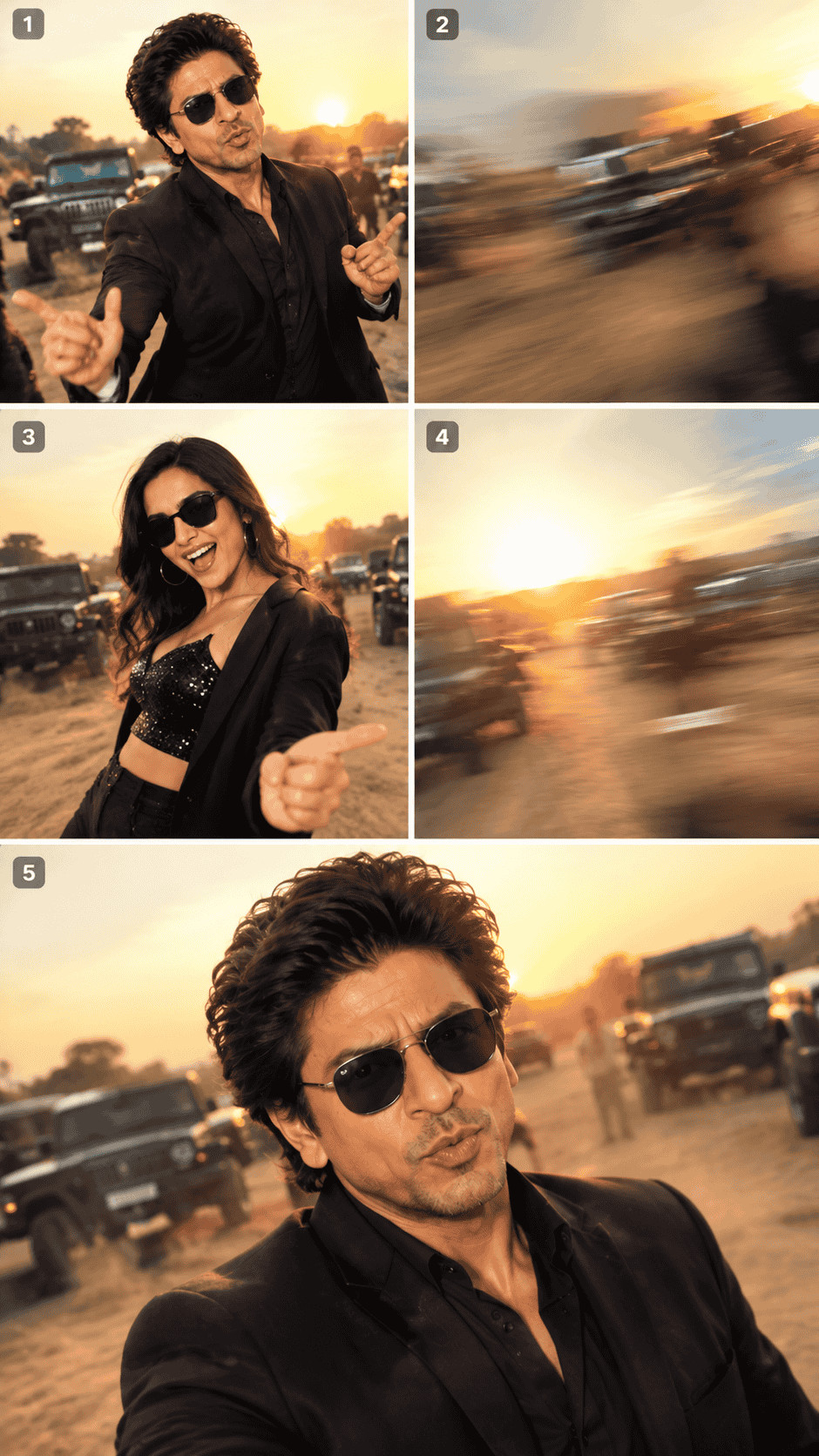
SHOT 1 — OPENING: Recreate the opening composition from the reference video. Match the subject's position, body posture, dance rhythm, hand gestures, facial expression, camera distance and camera movement. Preserve the original environmental atmosphere and lighting.
SHOT 2 — FAST CAMERA TRANSITION: Reproduce the reference video's rapid camera movement or whip-pan transition. Match the direction, speed, rotation, framing and natural motion blur. The transition should feel like a real handheld camera movement rather than an artificial digital effect.
SHOT 3 — CHARACTER REVEAL: Recreate the moment when the second character appears. Match the framing, timing, body movement, hand gestures, head movement and facial expression from the reference. Preserve the same visual perspective and environmental lighting.
SHOT 4 — COMEDIC MOVEMENT: Recreate the funny dance movement from the reference while keeping the character's identity consistent. Movements should feel energetic, playful and physically believable. Avoid distorted limbs, unnatural body bending, floating feet or exaggerated motion that was not present in the reference.
SHOT 5 — FINAL LOOK: Recreate the final close-up or reaction shot from the reference. Match the camera distance, face position, head angle, eye direction and comedic expression. Preserve the timing of the final reaction and maintain natural facial movement.
CAMERA: Vertical 9:16 format, realistic handheld smartphone-camera aesthetic, natural camera shake, realistic rolling-shutter behavior, authentic motion blur, wide-angle perspective where present, quick camera movements and slightly imperfect framing. Do not make the footage look like a perfectly stabilized studio production unless the reference video has that style.
LIGHTING: Preserve the lighting atmosphere of the reference video. Maintain natural highlights, realistic shadows, environmental reflections and cinematic contrast. If the reference contains golden-hour sunlight, preserve the warm sunlight, soft backlight, natural rim lighting, atmospheric haze and subtle lens flare.
MOTION: Prioritize realistic human movement. Follow the reference choreography and timing closely. Do not add unnecessary dance steps, gestures, poses, camera movements or slow-motion effects that are not present in the reference.
REALISM: Photorealistic video, realistic anatomy, natural skin texture, believable facial expressions, physically accurate clothing movement, realistic hair movement, natural body weight and authentic environmental lighting.
CONTINUITY: Maintain the same character identity, clothing appearance, hairstyle and overall proportions from beginning to end. Avoid face switching, facial distortion, changing body shape, extra fingers, duplicated limbs or sudden changes in clothing.
EDITING: Preserve the reference video's overall shot order, pacing, transitions and comedic timing. The final video should maintain the same visual rhythm while using the uploaded character as the main identity.
OUTPUT: Vertical 9:16, social-media-ready cinematic video, highly realistic, natural movement, consistent character identity and entertaining comedic timing.
IMPORTANT: Treat the uploaded reference video as the source of truth for movement, camera behavior, timing and composition. Do not create a completely new choreography. Recreate the visual sequence as closely as the model allows while replacing the character identity with the uploaded image.
Copy the prompt: Use the dedicated copy button above to get the prompt.
Open your editing tool: Use your preferred AI image generator (ChatGPT, Google Gemini, Midjourney, or Bing).
Personalize the variables: Adjust background, clothing, lighting, pose, or mood according to your requirements.
Generate & refine: Generate the image and tweak small details if needed.
Export: Save the final high-quality output for your social media.
Article Tags
#AI Video Prompt#Celebrity AI Video#Funny Dance Video#Dance AI Prompt#AI Video Generator#Viral AI Video
Found this prompt useful?
SHARE:
Sana
Verified Creator
Curates practical AI prompts, photo-editing resources, video-editing ideas, and creator-focused tutorials to help readers create top-quality digital content.
Super helpful prompt! The lighting and peacock feather crown came out incredible on Bing Image Creator.
Priya PatelAugust 31, 2026
Thank you PromptCopyAI! Shared this with all my photo editing groups.
Why This Prompt Works Better Than a Simple Dance Prompt
A basic prompt such as “make this person dance with a celebrity” leaves too many decisions to the AI model.
The model has to decide the choreography, camera position, environment, transitions, expressions and timing by itself.
That can produce inconsistent results.
One shot may have a different camera angle, the character's face may change between frames, and the dance movement may not match the original reference.
A structured prompt reduces this uncertainty.
Instead of treating the entire video as one continuous instruction, the prompt divides the sequence into individual shots.
This gives the model clearer information about what should happen during different parts of the video.
How the Reference Video Helps
The reference video is one of the most important parts of this workflow.
It provides visual information that would be difficult to describe entirely through text.
For example, a reference video can communicate how quickly the camera moves, how a person turns their head, when a second character enters the frame, how long a reaction lasts and how a transition happens.
The AI can then use those visual cues while generating the new version.
For this reason, choose a reference video with clear movement and reasonably good visual quality.
A video with extremely fast cuts, heavy motion blur or very complicated choreography can be more difficult for an AI model to reproduce consistently.
Keep the Character Identity Consistent
Character consistency is especially important when creating AI videos from personal photographs.
The uploaded image should clearly show the person's face and appearance.
Avoid heavily blurred photographs or images where the face is hidden.
The prompt should explicitly tell the model to preserve facial identity, facial structure, hairstyle and body proportions.
This is particularly useful when the video contains several camera angles.
Without identity instructions, the generated character may look slightly different in different shots.
The face might change during a close-up, the hairstyle could shift, or the character's proportions could become inconsistent.
Clear identity instructions help reduce these problems.
How to Create the Funny Dance Video
Start by selecting a suitable dance reference video.
The video should contain the type of movement and camera style you want.
Next, prepare the character image that you want to use.
A clear full-body or upper-body photograph generally provides useful information about appearance, clothing and proportions.
Upload the required reference material into your compatible AI video tool.
Add the copy-paste prompt and clearly identify which image is the character reference and which video is the motion reference.
Once everything is uploaded, generate the video.
After generation, watch the complete result instead of judging only the first few seconds.
Look for facial consistency, natural hand movement, body proportions, camera transitions and synchronization with the reference.
If something looks incorrect, adjust that specific instruction and generate another version.
How to Make the Dance Look Funny
The comedy should come from the situation and timing rather than making the character move unnaturally.
Natural but slightly exaggerated expressions can work well.
A funny head movement, unexpected reaction, playful hand gesture or deadpan look toward the camera can create a stronger comedic moment than extremely exaggerated body movements.
The camera can also contribute to the humor.
A sudden whip-pan followed by an unexpected character reveal can create a visual punchline.
Similarly, a quick transition into a serious-looking close-up can make the final reaction feel funny.
The key is timing.
The character should appear to react at the correct moment.
Creating a Cinematic Social Media Look
For Instagram Reels and YouTube Shorts, vertical 9:16 is generally the most practical format for this type of content.
The camera should feel natural rather than overly polished.
A smartphone-style handheld aesthetic can make the generated video feel more like real social-media footage.
Natural motion blur is also important during fast movements.
Without motion blur, rapid camera movements can look artificial or digitally generated.
Small imperfections in handheld framing can actually improve realism.
The goal is not to make every frame perfectly stable.
Instead, the footage should feel like a real camera operator captured the moment.
Golden-Hour Celebrity Dance Style
One popular visual direction for this type of edit is warm golden-hour lighting.
If the reference contains sunset lighting, preserve that visual atmosphere.
Warm sunlight can create highlights around the character's hair and shoulders.
Soft backlighting can separate the character from the background, while atmospheric haze and subtle lens flare can add cinematic depth.
However, avoid adding golden-hour lighting when it is not present in the reference.
The purpose of the prompt is to recreate the reference style rather than randomly changing its environment.
Common Problems With AI Dance Videos
One of the most common issues is facial inconsistency.
The character may look correct in one shot but slightly different after a camera transition.
Another issue is unnatural hands or body movement.
Fast dance sequences can sometimes cause distorted fingers, unusual arm positions or incorrect body mechanics.
Camera movement can also become excessive.
If the prompt does not clearly define the reference camera behavior, the AI may introduce unnecessary zooms, rotations or slow motion.
These problems can often be reduced by strengthening the continuity instructions and explicitly telling the model not to add movements that are not present in the reference.
Tips for Better AI Video Results
Use a high-quality reference image with a clearly visible face.
Choose a reference video with understandable choreography and camera movement.
Avoid changing multiple creative elements at the same time.
If the character's face is inconsistent, focus your next prompt revision on identity preservation.
If the dance movement looks unnatural, strengthen the instructions around anatomy and physical movement.
If the camera movement is incorrect, describe the reference camera behavior more explicitly.
It is also useful to generate several versions rather than expecting the first generation to be perfect.
AI video generation involves many moving variables, especially when multiple characters, fast movement and camera transitions are involved.
Responsible Use of Celebrity AI Videos
When creating videos involving recognizable celebrities, it is important to present fictional AI-generated scenes accurately.
An AI-generated dance video should not be presented as authentic footage of a celebrity participating in an event or recording.
For social-media publishing, clearly identifying fictional or AI-generated content can help viewers understand what they are watching.
This distinction becomes particularly important when the generated scene depicts something that did not actually happen.
The purpose of these edits can remain entertainment, creative experimentation and fan-made content without presenting synthetic footage as real-world footage.
Can This Prompt Be Used for Different AI Video Tools?
The exact behavior of an AI video generator depends on the platform and its available reference-video features.
Some tools may support image-to-video generation, while others may allow reference videos, character images or multiple inputs.
The prompt can therefore be treated as a structured creative framework rather than a guarantee that every tool will reproduce every shot identically.
If a platform does not support reference-video matching, you may need to simplify the instructions and describe the choreography directly.
For tools that support reference videos, preserving the shot-by-shot structure can provide much more useful guidance.
Final Thoughts
The Celebrity Funny Dance AI Video Editing Prompt 2026 provides a structured approach to creating entertaining AI-generated dance videos.
Instead of relying on a short instruction such as “make this person dance,” it describes the reference video, character identity, choreography, camera movement, lighting, expressions, transitions and realism.
That structure makes the creative objective much clearer.
For the best results, start with a strong reference video and a clear character image. Keep the identity consistent, follow the original movement closely and avoid unnecessary changes to the choreography.
The funniest results do not necessarily require extreme animation. Natural body movement, well-timed reactions, expressive faces and unexpected camera reveals can create a much more believable comedic effect.
As AI video-generation technology continues to develop, reference-based workflows are becoming an increasingly interesting way for creators to experiment with short-form visual storytelling. This prompt can serve as a starting point for dance edits, reaction videos, cinematic fan creations and other creative social-media formats.
For creators building AI video content with platforms such as Flow and other compatible generators, the most important principle remains.
Photorealistic AI Saree Portrait Prompt: Create Warm, Cinematic Indian Portraits