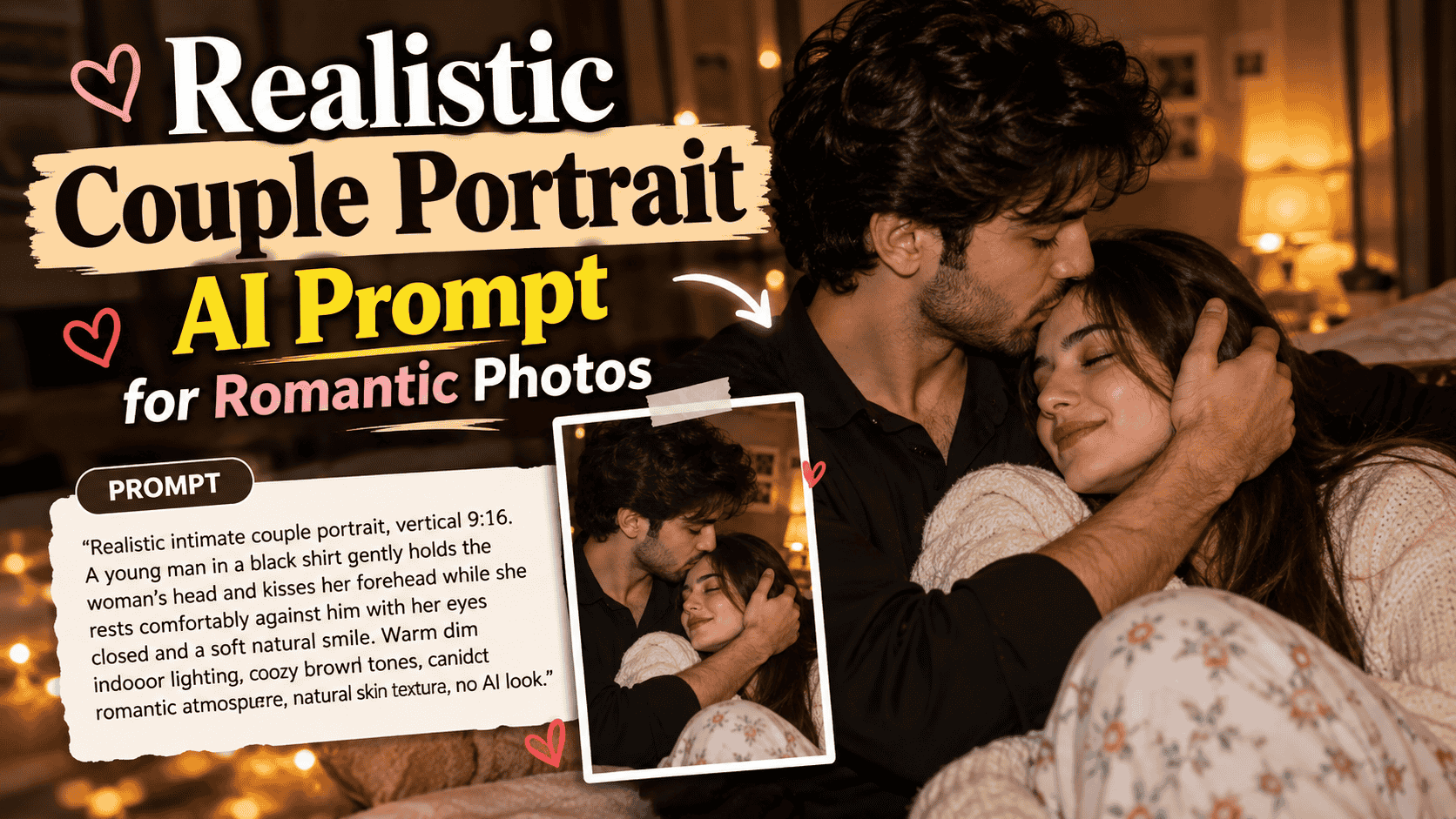
Featured image for: Realistic Couple Portrait AI Prompt: Create Natural Romantic Photos with AI
Realistic Couple Portrait AI Prompt: Create Natural Romantic Photos with AI
AI image generation has made it possible to create highly realistic lifestyle and portrait photography from a simple text description. However, getting a romantic couple portrait to look natural is not always easy. Poorly structured prompts can result in artificial facial expressions, overly smooth skin, awkward poses, incorrect hands, unrealistic lighting, or images that immediately feel AI-generated.
A strong prompt needs more than just “a romantic couple.” It should clearly describe the couple’s pose, expressions, clothing, environment, lighting, camera feel, color palette, and overall mood.
If you want to generate a warm, intimate, and realistic couple portrait with a natural photography aesthetic, the following prompt is a strong starting point.
ChatGPT Prompts
Realistic Intimate Couple Portrait AI Prompt
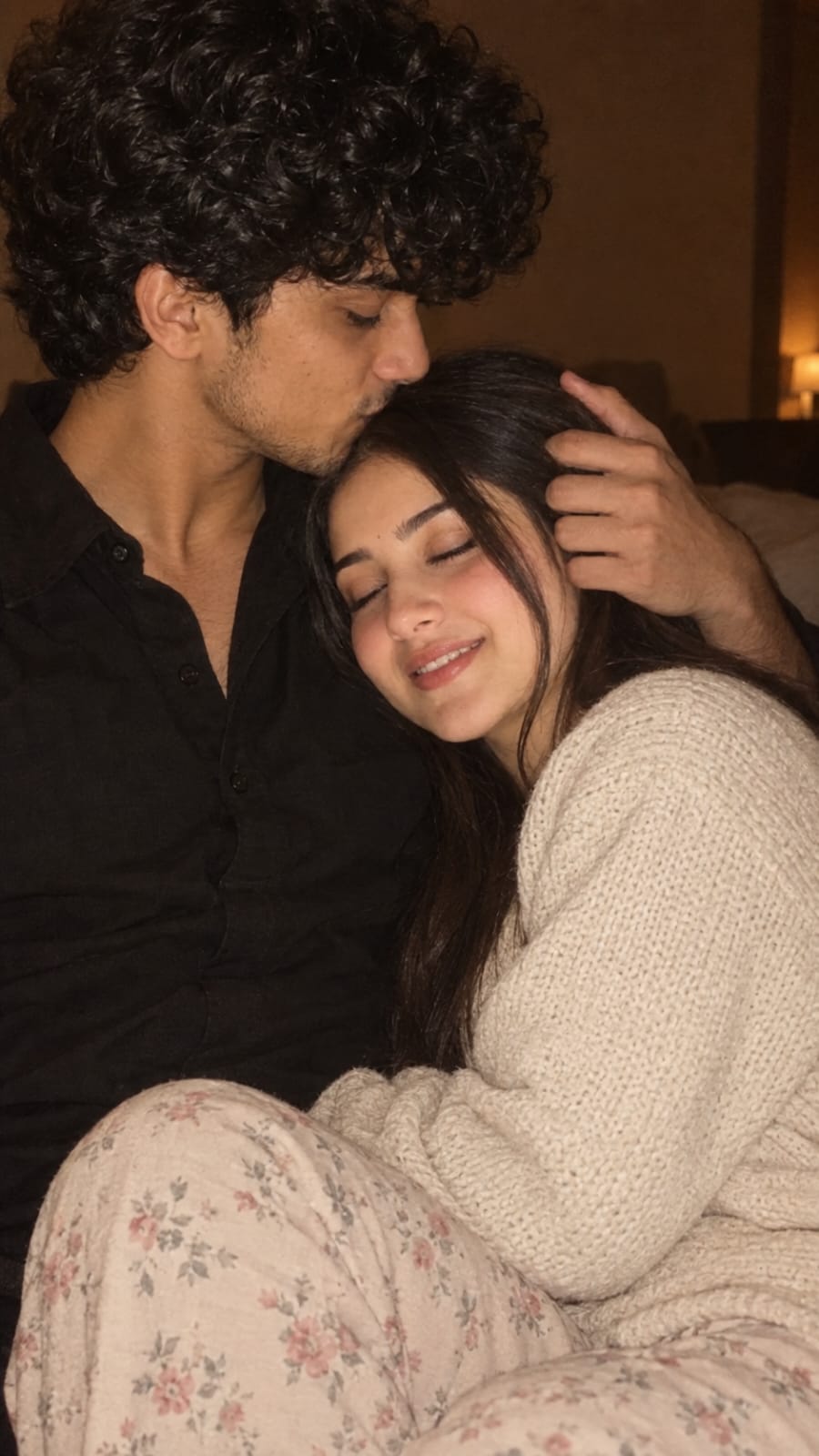
Realistic intimate couple portrait, vertical 9:16. A young man in a black shirt gently holds the woman’s head and kisses her forehead while she rests comfortably against him with her eyes closed and a soft natural smile. He has thick wavy dark hair, light stubble and beard. She has long straight dark-brown hair, wearing a cozy cream knit sweater with soft floral pajama pants. Warm dim indoor lighting, soft direct flash, cozy brown tones, candid romantic atmosphere, natural skin texture, realistic facial features, subtle shadows, shallow depth of field, authentic photography, slightly grainy low-light aesthetic, no over-editing, no AI look.
Click copy to use in ChatGPT Prompts
This prompt works because it combines several important elements of realistic AI photography rather than focusing only on the appearance of the characters.
Let’s understand how each part contributes to the final image.
Start with a Clear Photography Style
The prompt begins with:
“Realistic intimate couple portrait”
These few words immediately establish the visual direction. Instead of asking the AI to simply create a couple, the prompt specifies that the result should look like a realistic portrait photograph.
The word “intimate” also helps define the emotional atmosphere. Here, intimacy does not need an exaggerated pose. It can be communicated through small gestures, comfortable body language, closed eyes, a forehead kiss, and relaxed expressions.
Complete Step-by-Step Editing Workflow
Copy the prompt: Use the dedicated copy button above to get the prompt.
Open your editing tool: Use your preferred AI image generator (ChatGPT, Google Gemini, Midjourney, or Bing).
Personalize the variables: Adjust background, clothing, lighting, pose, or mood according to your requirements.
Generate & refine: Generate the image and tweak small details if needed.
Export: Save the final high-quality output for your social media.
Curates practical AI prompts, photo-editing resources, video-editing ideas, and creator-focused tutorials to help readers create top-quality digital content.
Super helpful prompt! The lighting and peacock feather crown came out incredible on Bing Image Creator.
Priya PatelAugust 31, 2026
Thank you PromptCopyAI! Shared this with all my photo editing groups.
For realistic results, simple emotional actions often work better than complicated poses.
Terms such as these can be useful in similar prompts:
Setting / Feature
Recommendation / Style
·
Realistic photography
·
·
Candid couple portrait
·
·
Lifestyle photography
·
·
Natural couple photography
·
·
Intimate portrait
·
·
Authentic photography
·
·
Cinematic lifestyle portrait
·
You do not need to use every term at once. A few specific style descriptions are usually more effective than filling the prompt with repetitive keywords.
Use the Right Aspect Ratio
The prompt specifies:
“Vertical 9:16”
Aspect ratio has a major impact on composition.
A 9:16 vertical frame is especially useful when you are creating visuals for Instagram Stories, Reels, YouTube Shorts, Pinterest-style vertical content, mobile wallpapers, or other portrait-oriented platforms.
The vertical composition gives the AI enough room to show the couple’s upper body, clothing, posture, and surrounding environment.
For social media content, choosing the aspect ratio before generating the image can reduce the amount of cropping required later.
If the image is intended for a regular Instagram feed post, you may instead choose a square or 4:5 portrait format depending on your design.
Describe the Couple’s Interaction Naturally
One of the most important parts of this prompt is:
“A young man in a black shirt gently holds the woman’s head and kisses her forehead while she rests comfortably against him.”
This description tells the image generator exactly what is happening in the scene.
Instead of using a broad instruction such as “romantic couple posing together,” the prompt describes a specific physical interaction.
The man is not simply standing beside the woman. He is gently holding her head and kissing her forehead.
The woman is not looking directly at the camera or making an exaggerated pose. She is resting naturally against him.
These details can make the final image feel more like a spontaneous photograph rather than a staged AI composition.
When writing your own couple prompts, think about small natural actions such as holding hands, leaning on a shoulder, sharing a quiet smile, sitting close together, walking side by side, or giving a gentle forehead kiss.
Small gestures can communicate emotion without making the composition overly dramatic.
Natural Facial Expressions Matter
The woman is described as having:
“Her eyes closed and a soft natural smile.”
This is an important detail.
AI-generated portraits can sometimes produce expressions that appear too dramatic, perfectly symmetrical, or unnatural. Clearly specifying a subtle expression gives the model better guidance.
A soft smile combined with closed eyes creates a peaceful and comfortable mood.
The man’s action—the forehead kiss—also communicates affection without requiring an exaggerated facial expression.
For realistic portrait prompts, expressions such as “subtle smile,” “relaxed expression,” “natural expression,” and “candid emotion” can be more effective than simply asking for a “beautiful smile.”
The goal is to make the characters look like they are experiencing the moment rather than posing for an advertisement.
Add Character Details Without Overloading the Prompt
Setting / Feature
Recommendation / Style
The man is described with:
“Thick wavy dark hair, light stubble and beard.”
The woman has:
“Long straight dark-brown hair.”
These descriptions provide enough information to create recognizable visual characteristics while leaving room for the AI to produce a natural-looking person.
This balance is important.
Adding too many details about facial proportions, eye shape, jawline, eyebrows, nose, lips, hairstyle, skin tone, makeup, and other features can sometimes make a prompt unnecessarily complicated.
If exact character consistency is not required, focus on the most visually important characteristics.
Hair style, hair color, clothing, approximate age group, expression, and pose are often enough for lifestyle photography.
Clothing Helps Build the Mood
Wardrobe plays an important role in this prompt.
The man wears a simple black shirt, while the woman wears a cozy cream knit sweater with soft floral pajama pants.
This combination supports the relaxed indoor atmosphere.
The black shirt gives visual contrast, while the cream knit sweater adds warmth and softness. Floral pajama pants make the scene feel casual and personal rather than formal.
This is a good example of how clothing can communicate the context of a photograph.
If the same couple were wearing formal suits and evening dresses, the image would naturally feel very different.
For a cozy home portrait, comfortable fabrics, neutral colors, sweaters, simple shirts, and casual clothing usually fit the visual story better.
Warm Dim Lighting Creates an Intimate Atmosphere
Lighting is one of the strongest elements in any AI photography prompt.
This prompt uses:
“Warm dim indoor lighting, soft direct flash, cozy brown tones.”
Together, these instructions create a warm low-light environment.
Warm indoor lighting can make the scene feel comfortable and personal. Brown tones help maintain a cozy color palette, while soft direct flash can give the photograph a spontaneous snapshot quality.
The combination is especially useful when you want something that feels closer to a real low-light indoor photograph rather than a perfectly lit commercial studio image.
You can experiment with similar lighting terms such as:
This helps reduce the overly polished appearance often associated with AI portraits.
Real skin is not perfectly smooth. It contains subtle texture, highlights, shadows, pores, and small variations.
When an AI portrait has completely smooth skin, excessive glow, or extreme facial symmetry, the result may look more like digital artwork than photography.
Adding “natural skin texture” tells the generator to preserve some of the imperfections that make photography feel authentic.
Avoid stacking too many similar instructions, however. One or two strong descriptions are usually sufficient.
Add Subtle Shadows for Depth
The prompt includes:
“Subtle shadows.”
Shadows are important because they give faces, clothing, hair, and the surrounding environment depth.
If an image is evenly illuminated from every direction, it can look flat or synthetic.
Soft shadows around the face, under the hair, around clothing folds, and in the background make the photograph feel more three-dimensional.
For an intimate indoor scene, the shadows should generally remain soft rather than extremely dramatic.
This supports the relaxed mood while maintaining realistic depth.
Shallow Depth of Field Gives a Photography Look
Another useful phrase is:
“Shallow depth of field.”
In photography, shallow depth of field keeps the main subject sharp while allowing the background to become softly blurred.
For a couple portrait, this can keep attention on the faces and emotional interaction rather than unnecessary background details.
It also creates the visual impression of a photograph taken with a portrait-oriented camera and lens.
The background does not need to disappear completely. A subtle amount of environmental detail can make the image feel authentic.
The goal is to separate the couple naturally from the background without creating an artificial blur effect.
A Slight Grain Can Improve the Low-Light Feel
The prompt asks for a:
“Slightly grainy low-light aesthetic.”
This is a useful creative choice.
Many real photographs taken indoors in low light contain a small amount of visible grain or digital noise. Adding a subtle grain effect can therefore make an AI-generated photograph feel less polished and more spontaneous.
The key word here is “slightly.”
Too much grain can reduce facial detail and image quality. A subtle amount can add character without distracting from the couple.
This works particularly well when combined with warm indoor lighting and direct flash.
Avoid the Over-Edited AI Look
The final instructions are:
“No over-editing, no AI look.”
These instructions reinforce the overall direction of the prompt.
The goal is not to create flawless fantasy characters. The goal is to produce something closer to authentic lifestyle photography.
You can further support this aesthetic by avoiding unnecessary terms such as “perfect face,” “flawless skin,” “ultra-glamorous,” or excessive beauty-related descriptions.
Realism usually improves when the prompt focuses on believable lighting, natural expressions, genuine body language, realistic skin, and photographic imperfections.
How to Customize This Couple Portrait Prompt
The same prompt structure can be reused for many different romantic portrait concepts.
For example, you can change the environment from a cozy room to a living room, balcony, bedroom, café, rainy window, or evening apartment.
You can also change the action.
Instead of a forehead kiss, the couple could be sitting together on a sofa, holding hands, laughing quietly, looking at each other, or resting their heads together.
Lighting can also completely transform the mood.
Warm lamp lighting creates a cozy atmosphere, while morning window light produces a fresh and peaceful feeling. Golden-hour sunlight can make the image more cinematic, while direct flash can create a casual social-media photography aesthetic.
The important thing is to maintain consistency between the pose, environment, clothing, lighting, and mood.
Tips for Getting Better AI Couple Images
When generating couple portraits, start with a clear concept rather than adding every possible photography keyword.
Describe the main action first. Then add character appearance, wardrobe, environment, lighting, camera aesthetic, and realism instructions.
If your first result looks too artificial, simplify the prompt rather than automatically making it longer.
You can also try changing one element at a time.
For example, keep the pose unchanged and test different lighting. Then keep the lighting and experiment with clothing or background.
This makes it easier to understand which instructions are improving the final result.
Hands and close physical interactions can also be challenging for some image models. Using simple, clearly described poses generally produces more consistent results than complicated overlapping body positions.
Why This Prompt Works for Romantic AI Photography
The strength of this prompt comes from balance.
It contains enough information to establish a clear visual story without turning the description into an unnecessarily long list of instructions.
The couple has a defined interaction.
Their appearance and clothing are described.
The lighting and color palette establish the mood.
Photography terms such as shallow depth of field and subtle grain establish the visual style.
Finally, realism instructions help prevent excessive retouching.
All these elements work together to create a photograph that feels warm, candid, personal, and believable.
Final Thoughts
Creating a realistic romantic couple portrait with AI is less about adding hundreds of descriptive words and more about choosing the right details.
Start with the emotional moment you want to capture. Describe a natural pose and expression, add simple character details, choose clothing that matches the environment, and define your lighting carefully.
For this particular concept, the forehead kiss, relaxed posture, warm indoor lighting, cream knit clothing, brown color palette, natural skin texture, subtle shadows, shallow depth of field, and slight low-light grain all contribute to the same cozy visual story.
That consistency is what makes the prompt effective.
If your goal is a realistic couple portrait rather than a heavily stylized AI artwork, keep the final image natural. Avoid excessive beauty retouching, extreme lighting, complicated poses, and unnecessary prompt stuffing.
A simple romantic moment captured with believable photography details can often create a much stronger image.
Whether you are creating visuals for social media, romantic creative projects, AI photography experiments, mood boards, or personal design concepts, this prompt provides a flexible foundation that can easily be customized for different settings, outfits, poses, and moods.
The best results come from treating the prompt like instructions for a real photographer: explain who is in the frame, what they are doing, how the moment feels, how the scene is lit, and what kind of photograph you want to capture.
Keep it natural, specific, and visually consistent—and the result has a much better chance of feeling like a genuine photograph rather than an obviously AI-generated image.
Trending Ganpati Bappa AI Video Editing Prompt: Create Divine Cinematic AI Videos