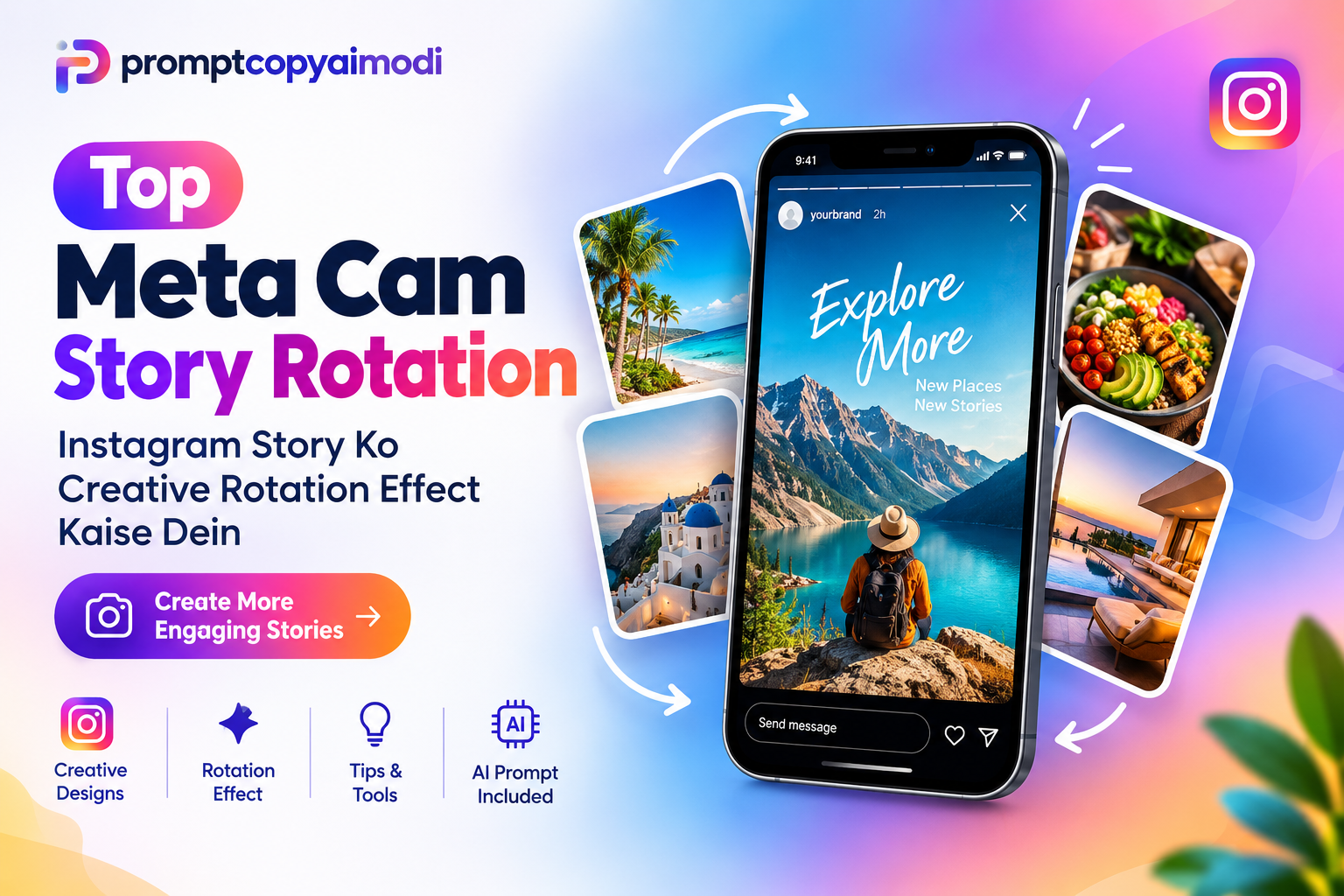
Featured image for: Top Meta Cam Story Rotation: Instagram Story Ko Creative Rotation Effect Kaise Dein
Instagram Stories ab sirf photo ya video upload karne ka medium nahi rah gaya hai. Creators, influencers, businesses aur brands Stories ka use audience engagement, product promotion, announcements aur brand awareness ke liye karte hain.
Problem ye hai ki agar har Story same static image, simple text aur basic sticker ke saath publish ki jaye, to audience ka attention maintain karna difficult ho sakta hai.
Isi wajah se creative Story effects ka importance badh gaya hai.
Meta Cam Story Rotation style ka rotating visual effect Instagram Story ko ek dynamic aur modern look de sakta hai. Is type ke design me photos, cards ya visual elements ko rotation/carousel movement ke concept ke saath present kiya jata hai.
Is article me hum step-by-step samjhenge:
· Meta Cam Story Rotation kya hai
· Instagram Story me rotation effect kyon use karein
Setting / Feature
Recommendation / Style
· Rotation-style Story kaise design karein
· Kaunse tools useful hain
· AI se Story design kaise banayein
· Copy-paste AI prompt kya use karein
Complete Step-by-Step Editing Workflow
Copy the prompt: Use the dedicated copy button above to get the prompt.
Open your editing tool: Use your preferred AI image generator (ChatGPT, Google Gemini, Midjourney, or Bing).
Personalize the variables: Adjust background, clothing, lighting, pose, or mood according to your requirements.
Generate & refine: Generate the image and tweak small details if needed.
Export: Save the final high-quality output for your social media.
Curates practical AI prompts, photo-editing resources, video-editing ideas, and creator-focused tutorials to help readers create top-quality digital content.
Instagram Story Rotation Effect Kaise Create Karein?
Step 1: Story Ka Objective Decide Karein
Sabse pehle decide karein ki Story ka purpose kya hai.
Setting / Feature
Recommendation / Style
· Product promotion
· New service announcement
· Travel showcase
· Portfolio
· Educational content
· Event promotion
· Sale announcement
· Personal creator content
Objective clear hone ke baad design banana kaafi easy ho jata hai.
Step 2: Images Select Karein
Rotation effect ke liye high-quality images use karna important hai.
Setting / Feature
Recommendation / Style
· Clear honi chahiye
· Similar visual quality ki honi chahiye
· Subject clearly visible hona chahiye
· Background unnecessarily busy nahi hona chahiye
Agar aap 5 images use kar rahe hain to unke visual style ko as much as possible consistent rakhein.
Step 3: Main Image Select Karein
Rotation layout me ek hero image rakhein.
Ye image sabse prominent honi chahiye.
For example, fashion brand ke case me hero image ek model wearing the featured product ho sakti hai.
Supporting images ko hero image ke around arrange kiya ja sakta hai.
Step 4: Rotation Composition Banayein
Ab supporting images ko main image ke around arrange karein.
Ek simple structure:
IMAGE 1
IMAGE 2 MAIN IMAGE 3
IMAGE 4
Lekin final design me images ko slightly tilted cards, circular arrangement ya carousel-style perspective me place kiya ja sakta hai.
Step 5: Rotation Direction Add Karein
Audience ko movement ka visual indication dene ke liye arrows ka use kiya ja sakta hai.
For example: ↻ Rotate
Lekin arrows ko overuse nahi karna chahiye.
Ek ya do subtle arrows enough hote hain.
Instagram Story Rotation Ke Liye Useful Tools
Aap manually bhi design bana sakte hain aur AI ki help bhi le sakte hain.
Setting / Feature
Recommendation / Style
Tool Type
Best Use
Canva
Beginner-friendly Story design
Adobe Express
Professional templates
CapCut
Motion/animation
Photoshop
Advanced design
AI Image Tools
Concept & visual generation
Video Editors
Actual rotation animation
Agar aap beginner hain, to pehle static rotating composition create karna easier rahega. Uske baad us design ko animation de sakte hain.
Static Rotation vs Animated Rotation
Feature
Static Rotation
Animated Rotation
Creation
Easy
Moderate
Design Time
Low
Higher
Movement
Visual illusion
Actual movement
Beginner Friendly
Yes
Moderate
Engagement Potential
Good
Potentially higher
Editing Skill
Basic
Intermediate
Agar aap Instagram content creation start kar rahe hain, to static version se beginning karna practical approach hai.
AI Se Instagram Story Rotation Design Kaise Banayein?
AI tools ka use karke aap design concept, layout aur visual direction generate kar sakte hain.
Lekin AI ko simple prompt dene ke bajay detailed instructions dena better hota hai.
Prompt me ideally ye information honi chahiye:
· Canvas size
· Platform
· Topic
· Main headline
· Number of images
· Layout
· Color theme
· Typography
· CTA
· Visual style
· Brand name/logo
· Overall mood
Jitna specific prompt hoga, utna clear creative direction milega.
Copy-Paste AI Prompt
Create a premium Instagram Story design in 9:16 vertical format.
Topic: Top Meta Cam Story Rotation – Instagram Story Ko Creative Rotation Effect Kaise Dein
Design a modern, highly engaging Instagram Story that visually demonstrates a rotating photo carousel effect.
Show one large smartphone in the center displaying an Instagram Story. Around the smartphone, arrange 4–5 photo cards in a dynamic rotating/circular carousel composition.
Use curved arrows to visually communicate rotation and movement.
Add the main headline: “Top Meta Cam Story Rotation”
Add supporting text: “Instagram Story Ko Creative Rotation Effect Kaise Dein”
Visual style: Modern, premium, clean, colorful, technology-inspired and social-media friendly.
Use a sophisticated gradient background with good contrast.
Include subtle Instagram-inspired visual elements without copying the Instagram interface exactly.
Make the central smartphone the main focal point.
Keep all text readable and properly spaced.
Add a small CTA: “Create More Engaging Stories”
Include the brand name: “promptcopyaimodi”
Make the composition professional enough for a technology/blog website featured image.
Ye structure AI ko visual hierarchy samajhne me help karta hai.
Business Ke Liye Rotation Story Ideas
Businesses is concept ko different ways me use kar sakte hain.
E-commerce
Setting / Feature
Recommendation / Style
· Product front view
· Side view
· Detail shot
· Lifestyle photo
Restaurant
Food items ko rotating cards ke form me showcase kiya ja sakta hai.
Education Brand
Different courses ko rotating cards ke form me display kiya ja sakta hai.
Example: Data Science → AI → Python → Power BI
Real Estate
Property ke Exterior, Living room, Bedroom aur Kitchen images ko rotating layout me present kiya ja sakta hai.
Creators Ke Liye Rotation Story Ideas
Content creators bhi is design concept ko use kar sakte hain.
Setting / Feature
Recommendation / Style
· “My Week in Photos”
· “Top 5 Travel Moments”
· “Behind the Scenes”
· “My Favorite Looks”
· “Before vs After”
· “Top 5 Tips”
· “This Month Recap”
Is tarah rotation effect sirf promotional content ke liye limited nahi hai.
Rotation Story Me CTA Kyon Important Hai?
Agar Story ka objective traffic ya conversion generate karna hai, to visual effect ke saath clear CTA bhi hona chahiye.
Setting / Feature
Recommendation / Style
· Learn More
· Shop Now
· Read More
· View Collection
· Book Now
· Follow for More
· Visit Website
CTA short aur visually prominent rakhein.
Common Mistakes Jo Avoid Karni Chahiye
1. Too Much Text
Story ko article ki tarah fill na karein.
Instagram Story me short messaging generally better visual experience provide karti hai.
2. Too Many Images
Agar 10–15 images ek hi composition me daal denge, to design cluttered lag sakta hai.
3–5 supporting images ek practical starting point hai.
3. Poor Image Quality
Low-resolution images premium design ko immediately weak bana sakti hain.
4. Weak Contrast
Background aur text ke beech sufficient contrast hona chahiye.
5. Random Fonts
Ek design me bahut saare fonts use karna avoid karein.
Generally: 1 headline font + 1 supporting font sufficient hota hai.
6. CTA Hide Karna
Agar conversion objective hai, to CTA clearly visible hona chahiye.
Instagram Story Rotation Design Checklist
Setting / Feature
Recommendation / Style
Checklist
Status
9:16 format
✓
High-quality images
✓
Clear headline
✓
Strong main visual
✓
Rotation indication
✓
Consistent typography
✓
Good contrast
✓
Brand identity
✓
CTA
✓
Mobile readability
✓
SEO Ke Liye Blog Ko Kaise Optimize Karein?
Agar aap is topic par blog publish kar rahe hain, to primary keyword ko naturally use karein.
Primary Keyword
Meta Cam Story Rotation
Secondary Keywords
Setting / Feature
Recommendation / Style
· Instagram Story Rotation Effect
· Instagram Story Effect
· Creative Instagram Story
· Instagram Story Design
· Instagram Story Tips
· Instagram Story Editing
· AI Instagram Story Prompt
Keyword ko H1, Introduction, H2 headings, Meta title, Meta description, URL aur Image alt text me naturally use kiya ja sakta hai.
Keyword stuffing avoid karein. Content ka primary objective reader ko useful information dena hona chahiye.
Frequently Asked Questions (FAQ)
1. Meta Cam Story Rotation kya hai?
Meta Cam Story Rotation ek creative Story design concept hai jisme multiple visual elements ko rotating ya carousel-style composition me present kiya jata hai.
2. Kya Instagram Story me rotation effect use kiya ja sakta hai?
Haan, rotation-style design ko static graphic, animation ya video format me create karke Instagram Story ke liye use kiya ja sakta hai.
3. Instagram Story ka size kya hona chahiye?
Instagram Stories ke liye commonly 9:16 vertical format use kiya jata hai.
4. Kya AI se Instagram Story design bana sakte hain?
Haan. AI image/design generation tools se Story ke concepts aur visuals create kiye ja sakte hain. Better results ke liye detailed prompt dena useful hai.
5. Rotation Story business ke liye useful hai?
Haan. Products, services, courses, properties, food items aur portfolios ko creative visual format me showcase karne ke liye iska use kiya ja sakta hai.
6. Kya rotation effect ke liye video banana zaroori hai?
Nahi. Aap static design me bhi rotating carousel ka visual illusion create kar sakte hain. Actual movement ke liye animation/video use kiya ja sakta hai.
7. Ek Story me kitni images use karni chahiye?
Ye design par depend karta hai, lekin 3–5 supporting images se beginning karna generally manageable hai.
8. AI prompt me kya information deni chahiye?
Prompt me format, subject, layout, colors, typography, headline, CTA aur visual style clearly specify karna useful hota hai.
Conclusion
Top Meta Cam Story Rotation Instagram Stories ko visually interesting aur modern banane ka ek creative approach hai. Simple static image ke bajay rotating carousel-style composition audience ko ek different visual experience de sakti hai.
Aap ise products, courses, services, travel photos, portfolios, food, real estate aur creator content ke liye adapt kar sakte hain.
Sabse important baat ye hai ki sirf effect par focus na karein. Ek successful Story ke liye strong visual + short message + clear hierarchy + CTA + consistent branding ka combination zaroori hai.
Aur agar aap design manually create nahi karna chahte, to detailed AI prompt ki help se initial creative concept generate karke usse apne brand ke according customize kar sakte hain.
8. Featured Image Prompt
Create a premium 16:9 blog featured image for the article “Top Meta Cam Story Rotation: Instagram Story Ko Creative Rotation Effect Kaise Dein”. Show a modern smartphone in the center displaying an Instagram Story, surrounded by 4–5 rotating photo cards arranged in a dynamic circular carousel. Add subtle curved arrows to communicate rotation. Use a clean, colorful, technology-inspired gradient background, professional digital marketing aesthetic, strong visual hierarchy, readable headline space, polished high-resolution details, and a modern blog-thumbnail composition. Avoid clutter, distorted text, duplicate objects, and unrealistic phone proportions. Include the brand name “promptcopyaimodi” subtly.
Miniature Rainy Window AI Prompt: Create a Cinematic Tiny Girl Scene